YouTube
 Amazon
 Spotify
 Safari
 Chrome
Build Brand Trust & Recognition
Every link reinforces your brand identity. Users instantly recognize your domain and trust where the link leads. Perfect for email marketing, social media, and customer communications.

 Custom Branded Domains
Swap linktw.in for go.yourbrand.com. Your short links carry your name in every bio, post, email and QR code, and on phones they still open the right app. One DNS record, free SSL, and every LinkTwin feature.
Trusted by 50,000+ creators and marketers
Share it on
 Instagram
 TikTok
 Facebook
 LinkedIn
 X
X WhatsApp
 Pinterest
 Threads
The Trust Factor
Generic short links look suspicious and damage your brand. Branded domains build trust and recognition.
Why Custom Domains Matter
Your branded domain works across every LinkTwin feature: analytics and retargeting, QR codes and deep links that open apps.
Every link reinforces your brand identity. Users instantly recognize your domain and trust where the link leads. Perfect for email marketing, social media, and customer communications.
Stand out in crowded inboxes and social feeds. Branded links look professional in presentations, business cards, and all marketing materials. Show customers you're a real, established business.
Every branded link counts its clicks by country, device and source. Add Meta, Google and TikTok pixels with our link retargeting to turn every share into an audience.
One DNS record connects your domain, and the SSL certificate is set up for you. Then manage every branded link from the same dashboard.
Simple Setup Process
No technical skills needed. These are the exact steps and the exact record your dashboard asks for.
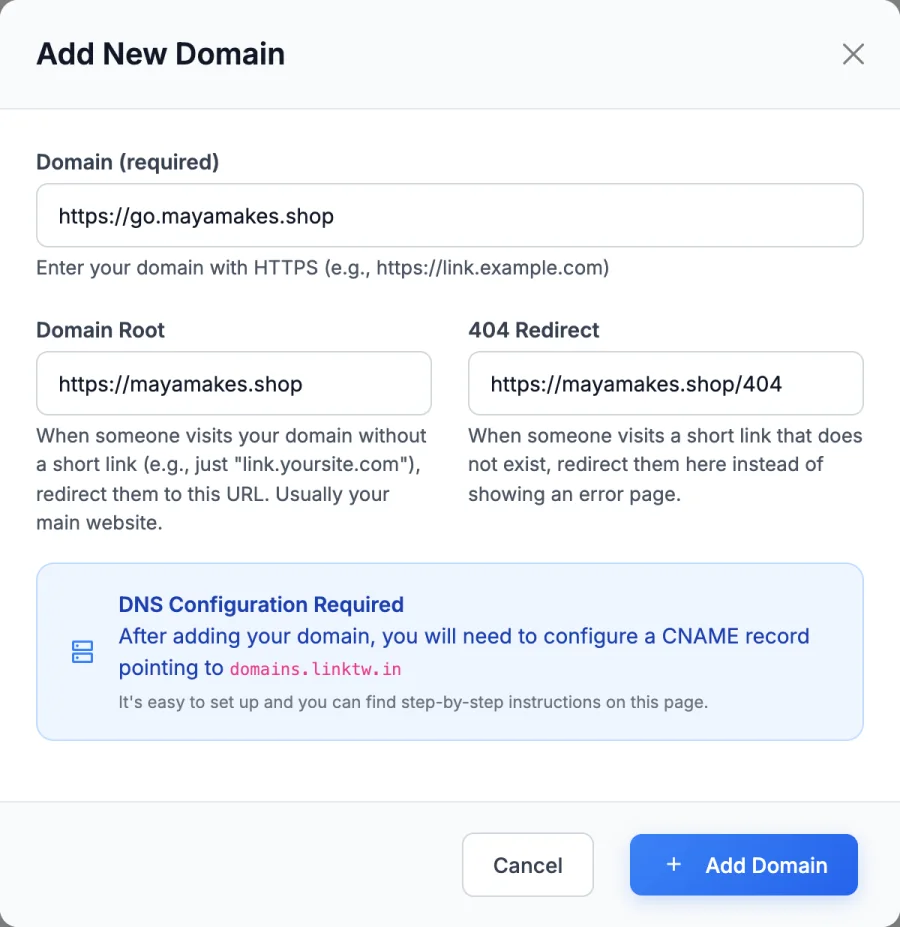
In your dashboard, open Branded Domains and add the domain or subdomain you want for your links, like go.yourbrand.com. A domain that already hosts your website can't be used, so pick a subdomain.
At your registrar or DNS provider, add one CNAME record: the name is your subdomain (or @ for a root domain) and the target is domains.linktw.in. Remove any A or AAAA record on that name. MX and TXT records can stay.
DNS changes usually take 5 to 30 minutes, sometimes up to 24 hours. Your SSL certificate is set up for you, and every new link can use your domain.
Who Uses Branded Domains
From startups to enterprises, branded domains elevate your marketing
Create memorable product links and promotional campaigns. Perfect for email marketing, social ads, and influencer partnerships.
Run each client's links on that client's own domain, from one account. Add several domains and pick the right one for every link.
Track product launches, feature announcements, and user onboarding. Branded links in transactional emails build trust.
Share affiliate links and sponsored content on your own name. Your links still open the YouTube, Amazon or Spotify app, the same as YouTube app links.
Create branded links for course materials, webinar registration, and student resources. Easy to remember and share.
Professional registration links, sponsor materials, and event updates. Track attendance and engagement in real-time.
Built for Professionals
Your branded domain unlocks the full power of LinkTwin's professional link management platform
Every branded link includes detailed click analytics with location data, device types, referrers, and real-time tracking. See exactly how your links perform across all channels.
Your branded links can open mobile apps directly: YouTube, Spotify, Instagram and 100+ more apps.
Add Facebook, Google, and custom pixels to your branded links for powerful retargeting campaigns.
Make QR codes on your own domain for print, packaging and signs.
Redirect users to different destinations based on their location. Perfect for international campaigns.
Add password protection to sensitive links. Perfect for client portals and private resources.
Set expiration dates or click limits on your branded links for time-sensitive promotions.
Every post links to its original source, so you can read each recommendation in context.

If you send traffic between apps on mobile, the experience is terrible and often it opens in browser instead of the app on your phone. This tool solves that issue nicely.

My man! Try LinkTwin if you haven't already, sends people straight to the app. Not affiliated, just an awesome tool.
Awesome tool for Instagram creators! IG story links don't open in dedicated apps, like YouTube. Use linktw.in to level-up your links, sending the audience straight to your content on their specific apps, rather than a login-prompt within the IG browser!

Hey @Texas_Miler, you should try linktw.in for when you post YouTube links on IG stories, that way it'll open directly in the app and it's easier for people to like/comment since they're signed in. It's been super useful for me!
Try linktw.in: put your YouTube link in. It makes your YouTube link open DIRECTLY into the YouTube app instead of in video purgatory. @seancannell #SMMW23
Para eso: NUNCA pongas tus Links. Si haces eso, tu video se vera en otro reproductor o una pagina dentro de otra App. Mejor usa la pagina linktw.in Ahi pondras el link de tu video y te generara un nuevo enlace que SI abrira tu video dentro de la App de YT.

Let's stop sharing links THE WRONG WAY because it's costing you views and engagement. Instead, copy the link to your video and paste it to this website called LinkTwin. From there, copy the link generated and share it across all your social channels.

Quick life hack: Use linktw.in to create a link that when shared on Instagram on mobile opens the video in the YT app, not in a web browser. This allows people to interact with your video as opposed to just watching and clicking off.

Post your video links in the comments with linktw.in So it opens up in app (lil nugget for you)

Hola! Te recomiendo uses esta web linktw.in para postear los links de Youtube y de esta manera al dar click abrira directamente en la app y no en el navegador o dentro de twitter. Aumentara tu engagement y eliminas friccion.

This is why I share my YouTube video either with linktwin, so it opens the YouTube App on their phone.

Tool Alert: You're sharing your YouTube links the wrong way on social! Use LinkTwin so your shared links open inside the YouTube app and increase your chances of getting more subscribers.

Want to grow on YouTube? Use this tool to make your video shareable: linktw.in

linktw.in usa tu link ahi para que se abra directamente en la app, asi se puedan suscribir mas facil.
Lil tip use linktw.in when sharing YouTube videos to social. Keeps people logged into their yt accounts. It boosts my YouTube engagement by a lot

Use this when posting the YouTube link on your stories, it redirects you to the app and not to the mobile site where half the people aren't even logged in.

Astuce pour ceux qui partagent des liens YouTube en story Instagram : Au lieu de rediriger les gens vers une page web par defaut ou ils ne pourront pas liker ou s'abonner, generez d'abord le lien sur linktw.in

これ使ってリンク作るとアプリに直で飛べるからチャンネル登録してくれる人増えるよ!別媒体に動員しやすくなる!!機会があったらやってみて!

Little handy tips for you. If others are like me, most are on mobile. Ur YouTube link open browser instead of YouTube app directly. Try this link.

CONTENT CREATOR HACK for YouTube videos! Hate posting link to YT on socials to no likes, subs, and possible shorter retention? Use linktw.in — Generate a link. It'll load up YT videos on YT app!
More questions? Contact our support team.
A custom branded domain is your own domain or subdomain, like go.yourbrand.com, used for your short links instead of a shared one like linktw.in. Your short links then show your name wherever you share them, and every LinkTwin feature keeps working on them: deep links that open apps, click analytics, QR codes and retargeting pixels.
A branded short domain is a short domain that carries your brand and only hosts your links, such as go.yourbrand.com or a short domain you buy for the purpose. Connect it to LinkTwin with one DNS record and every link you create on it uses your brand.
Add the domain in your LinkTwin dashboard under Branded Domains. Then, at your domain registrar or DNS provider (GoDaddy, Namecheap, Cloudflare and so on), create one CNAME record: the name is your subdomain, for example go, or @ for a root domain, and the target is domains.linktw.in. DNS changes usually take 5 to 30 minutes and sometimes up to 24 hours. The SSL certificate is set up for you.
Both work. Most brands use a subdomain such as go.yourbrand.com, because a domain that already runs your website cannot also serve short links. If you use a root domain, some registrars, GoDaddy for example, do not allow a CNAME record on @. A free Cloudflare account for your DNS solves that.
Yes. Every custom domain gets a free SSL certificate automatically, so your branded links open over HTTPS with the padlock. There is nothing to buy or renew.
Yes. Custom domains come from the Medium plan, and higher plans include more of them, so an agency can keep each client on its own domain and a company can keep one per brand or campaign, like shop.brand.com and events.brand.com. You pick the domain for each link and can set a default one. See pricing for the number of domains on each plan.
They usually earn more trust, and trust is what gets a link tapped. People see your name before they tap instead of a random string on a shared domain, which matters most in email, SMS and DMs, where unknown links look like spam. Your results depend on your audience, so compare the clicks in your own LinkTwin analytics before and after you switch.
Yes. A link on your domain works exactly like a linktw.in link: on phones it opens the YouTube, Amazon, Spotify or Instagram app and 100+ others, website links open in the real browser, and every click is counted.
Mostly, yes. Your links run on your domain, the bare domain can redirect to your website, and unknown links can go to a page you choose instead of an error. On paid plans you can also turn off the small Powered by LinkTwin note on the redirect page.
Yes. TikTok blocks the main linktw.in domain, so for TikTok bios and posts use your own domain or our alternative domain linktwin.co.
Custom domains come from the Medium plan, so your branded links work while your plan is active. Before you cancel, export your links and click data from the dashboard. You own the domain, so you can point it at another service at any time, which matters for links on printed materials.
Your domain works with every tool in the same account.

Short links

QR codes

Previews

Retargeting
Start with the link you share most. Create it free now, then move it to your own domain when you upgrade.
Free plan. No credit card. Cancel paid plans anytime.