Do you change my destination URL's meta tags by default?
No. By default, LinkTwin passes through the exact Open Graph tags (og:title, og:description, og:image) from your destination URL. We don't change anything. But when you need control, like for affiliate links, dynamic URLs, or broken previews, you can optionally customize the preview to show exactly what you want.
Which social platforms support custom link previews?
Custom link previews work on all major platforms that support Open Graph meta tags: Facebook, Instagram, LinkedIn, Twitter/X, WhatsApp, Telegram, Slack, Discord, Reddit, Pinterest, and more. As long as the platform crawls og:tags, your custom preview will show up.
How do I customize the preview for my link?
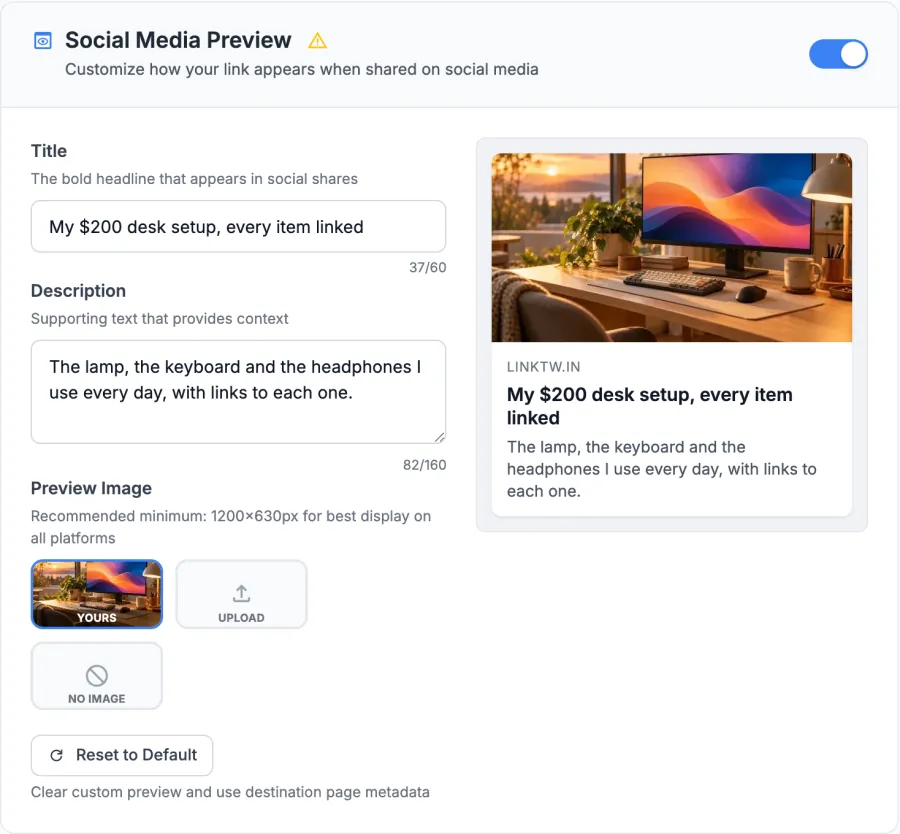
When you create or edit a LinkTwin link, switch on Social Media Preview. Write a title and a description, then keep the page's own image, upload your own or choose no image, and save. LinkTwin serves the new preview right away. To see exactly how Facebook reads it, paste the link into the Facebook Sharing Debugger.
Can I A/B test different previews for the same link?
Yes! Create multiple LinkTwin links pointing to the same destination URL, each with a different preview (different image, title, or description). Share them in different places and use our analytics to see which preview drives more clicks. This is perfect for testing different marketing messages.
What image size works best for link previews?
Use 1200x630 pixels, a 1.91:1 ratio. It is Facebook's recommended Open Graph size and works well on X, LinkedIn and WhatsApp too. LinkTwin accepts JPG, PNG or WebP images up to 1 MB and lets you crop your upload to 1200x630 before you save. Keep faces and text near the middle, because some apps show a square crop.
Is there a limit to how many custom previews I can create?
There is no separate limit. Every link you create can have its own custom preview, on every plan, including the free one. How many links and monthly clicks you get depends on your plan, so see pricing for the details.
What is a link preview?
A link preview is the card an app shows when you paste a link: usually an image, a title, a short description and the website's name. Apps build it from the Open Graph tags of the page the link points to. A custom link preview lets you choose those three things yourself.
How do I change the link preview image?
Open the link in LinkTwin, switch on Social Media Preview and choose Upload under Preview Image. Pick a JPG, PNG or WebP image, crop it to 1200x630 and save. You can also go back to the page's own image, or choose No image.
Why do I still see the old preview after changing it?
LinkTwin serves the new preview as soon as you save, but many apps keep a copy of the card they fetched before. Refresh it in Facebook's Sharing Debugger or LinkedIn's Post Inspector. WhatsApp and iMessage build the card when the message is sent, so messages already sent keep the old one. A new short link always shows the new card.
Does a custom preview change where my link goes?
No. The preview only changes what people see before they tap. The link still goes to your destination, and it still opens in the right app where LinkTwin supports it.






 Instagram
 Threads
 TikTok
 Snapchat
 Pinterest
 WhatsApp
 Telegram
 Slack
Slack Discord
 Reddit




 For marketers

 For affiliates
 Live tonight at 8linktw.in

 Google AnalyticsFiring
 United States/us
 United Kingdom/uk
 Germany/de