
 Instagram, TikTok & In-App Browsers
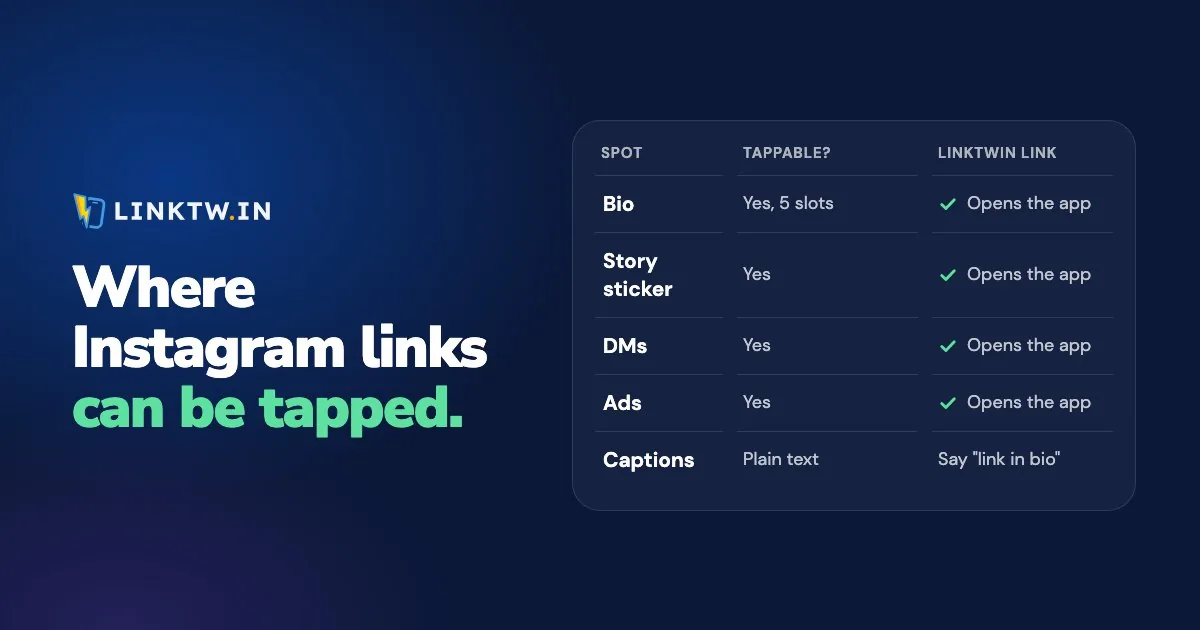
You can put a tappable link in your Instagram bio (up to five), on a Story Link sticker, in a Highlight that keeps that Story, in DMs and group chats, and on ads. A URL in an ordinary post or Reel caption isn't clickable, and neither is one in a comment.
The official way to a caption link is paid. As of November 2026, eligible public accounts on Meta One Advanced, Expert or Max get an Add link button for a set number of posts and Reels a month (4, 8 or 12 of each, by plan), and the link can't be edited after you share it. Meta says the plans are in limited testing and not available everywhere yet.
Every one of those spots opens a plain link the same way, in Instagram's own browser, where your follower isn't signed in to YouTube or Amazon, and that's why Instagram links don't open the app. A LinkTwin link works in every spot where Instagram makes a link tappable: it opens YouTube, Amazon, Spotify and 100+ other apps straight from the tap, already signed in, and sends a website to the phone's own browser. The Instagram link opener shows the two side by side.
| Spot | Can people tap it? | What belongs there |
|---|---|---|
| Bio | Yes, up to five links | The links that should stay on your profile |
| Story Link sticker | Yes, except on brand-new accounts and repeat rule breakers | The one link that Story is about |
| Highlights | Yes, if the saved Story has a sticker | A shop, newsletter or series people should find after 24 hours |
| DMs and group chats | Yes | The link someone asked for in the comments |
| Message requests | Text only until they accept | Send the link after they accept |
| Post and Reel captions | Only with Meta One, where it's offered | Otherwise, a pointer to your bio or today's Story |
| Comments | No | A reply that says you've sent a DM |
| Ads and boosted posts | Yes | The page the ad sends people to |
Links to your own website or shop are included on every paid plan.
Bio, Stories and Highlights
The bio is the spot that stays. Add links under Edit profile, then Links, and anyone can see them, on or off Instagram. When you have more than one, how to add multiple links to your Instagram bio shows how to order them so the right one gets the tap.
The Link sticker puts one link on a Story for 24 hours, and you can change its text so it says "shop the look" instead of a web address. Instagram opened it to every account in 2021, with no follower minimum, except for new accounts and accounts that keep breaking the Community Guidelines. When the sticker is missing from your tray, the checklist in adding a link to an Instagram Story usually finds the reason.
Save that Story to a Highlight and the sticker stays on your profile until you remove it. That's the place for a shop, a newsletter or a video series people should still find next month.
DMs and ads
A link in a DM or a group chat can be tapped, which makes the DM the answer to every "link?" comment. The comment itself stays plain text, so reply that you've sent a message, and put the link in the message.
Ads are the other way to put a website link on a post or a Reel: a boosted post or an ad can send people straight to your page. The tap still opens in Instagram's browser unless the ad carries a LinkTwin link, and links for social ads shows what that changes for a landing page.
Captions and comments
For most accounts, the caption's job is to name a spot that already works. Name it exactly: "first link in my bio" or "link on today's Story" beats a vague "link in bio" when five links are sitting there.
If you do have Meta One's Add link, put a LinkTwin short link in that field. Meta won't let you edit the link once the post is live, but you can change where a LinkTwin link points, so a Reel from March can send people to this week's video. Changing where a link points after you share it is included on every paid plan.
One short link for every spot
- Paste the destination into the Create App Link box in your LinkTwin dashboard and copy the short link.
- Put that same link everywhere people can tap: bio, Story sticker, a Highlight you want to keep, DM replies, the website field of an ad, and Add link on a Meta One caption.
- Tap it on your phone from the spot where you posted it, with the destination app installed.
- After a few days, open the click report: clicks over time, country, city when it can be located, device, operating system, browser and source. Adding a + to the end of a short link (
linktw.in/new-camera+) opens its stats page. LinkTwin counts clicks, not sales.
Custom endings like linktw.in/your-name are available from the Medium plan.
It's free to start: the free plan includes 10 links and 500 clicks a month.
When five bio slots aren't enough, a LinkTwin bio page holds the rest behind one address, and its YouTube, Amazon and Spotify buttons open their apps from Instagram too. Facebook, TikTok and X have in-app browsers of their own, and how in-app browsers work in each app compares what a link does in every one.