Click analytics

Link Click Tracking & Analytics for Every Link You Share

See how many people tap your links, where they are, which app sent them and when they click. LinkTwin counts every click on your short links, deep links, QR codes and bio page, with a dashboard for your whole account and a stats page for each link.

  • Free plan
  • No credit card
  • Stats on every link

Trusted by 50,000+ creators and marketers

Clicks from

  • Instagram
  • TikTok
  • Facebook
  • Threads
  • X
  • YouTube
  • Snapchat
  • Pinterest

And from

  • LinkedIn
  • WhatsApp
  • Telegram
  • Google
  • Reddit
  • Your bio page
How sources get their names

How to track link clicks

LinkTwin is a URL shortener with analytics built in. Every link you make is also a link tracker and a click counter, with nothing to install and no code to add to your site.

Short link tracking works the same way for deep links that open apps, for QR codes and for your bio page.

  1. Paste your link

    Any URL: a YouTube video, an Amazon product, a Spotify playlist, your shop or your website.

  2. Share the short link

    Put it in your bio, a Story, a post, an ad, an email or a QR code.

  3. Watch the clicks come in

    Open Statistics, or the link's own stats page, to see how many people clicked, from where and when.

Anatomy of a click

What LinkTwin records when someone taps your link

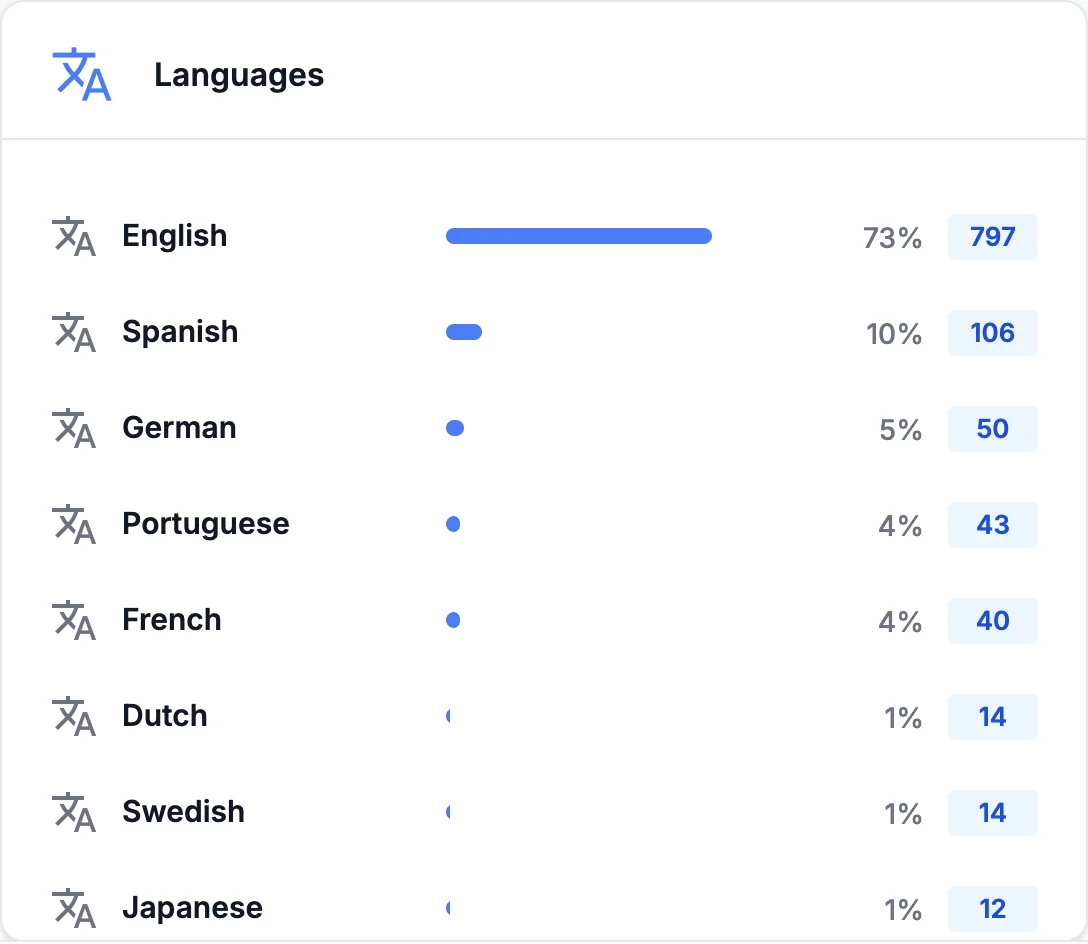
One tap, eight details. Pick an example to see what a single click looks like in your stats.

  • Time Fri, 8:14 PM In your time zone
  • Country Canada From the IP address
  • City Toronto When it can be located
  • Device Android Operating system
  • Browser Instagram In-app browser
  • Language French fr
  • Source Instagram android-app://com.instagram.android
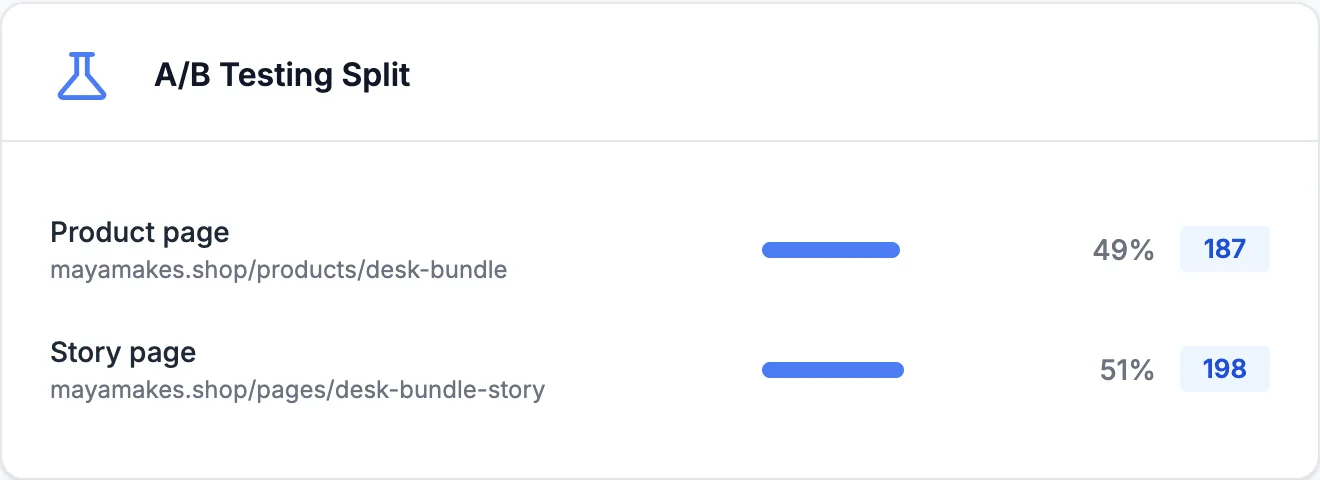
  • A/B variant B: Story page A/B test on this link

That is the record, plus the IP address used to count unique clicks. Visitors never sign in or fill anything in, and UTM tags, app installs and purchases are not part of your link stats.

  • Names or emails
  • Phone model
  • UTM tags
  • App installs
  • Purchases

The Statistics dashboard

Link analytics for your whole account

Statistics puts every link in one place. Pick a range, from today or the last 7 days to this month, all time or your own dates, and every card updates. The screenshots below show a creator's last 30 days.

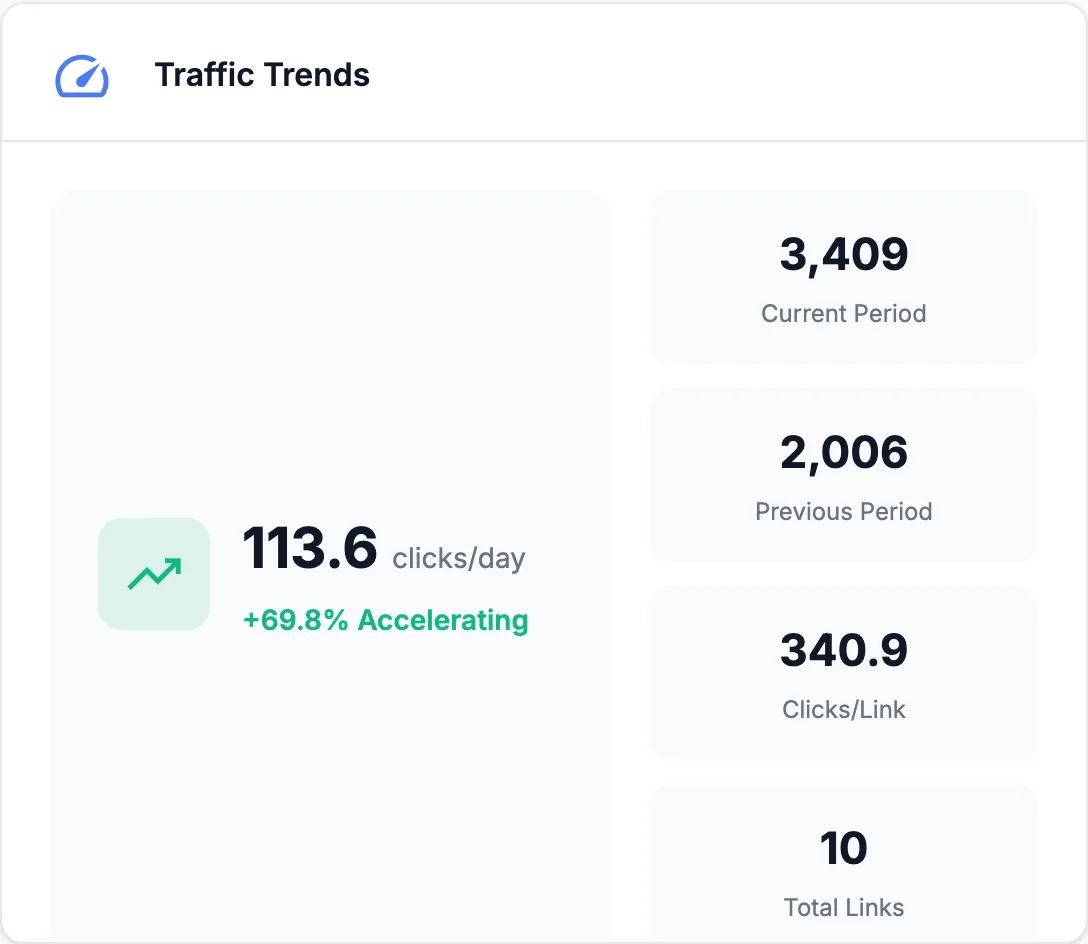
Dashboard totals: 3,409 clicks, 3,058 unique clicks, 769 clicks from Instagram, 1,582 clicks from the United States
The four numbers at the top: clicks and unique clicks in the range, each with its all-time total, then your top source and your top country.

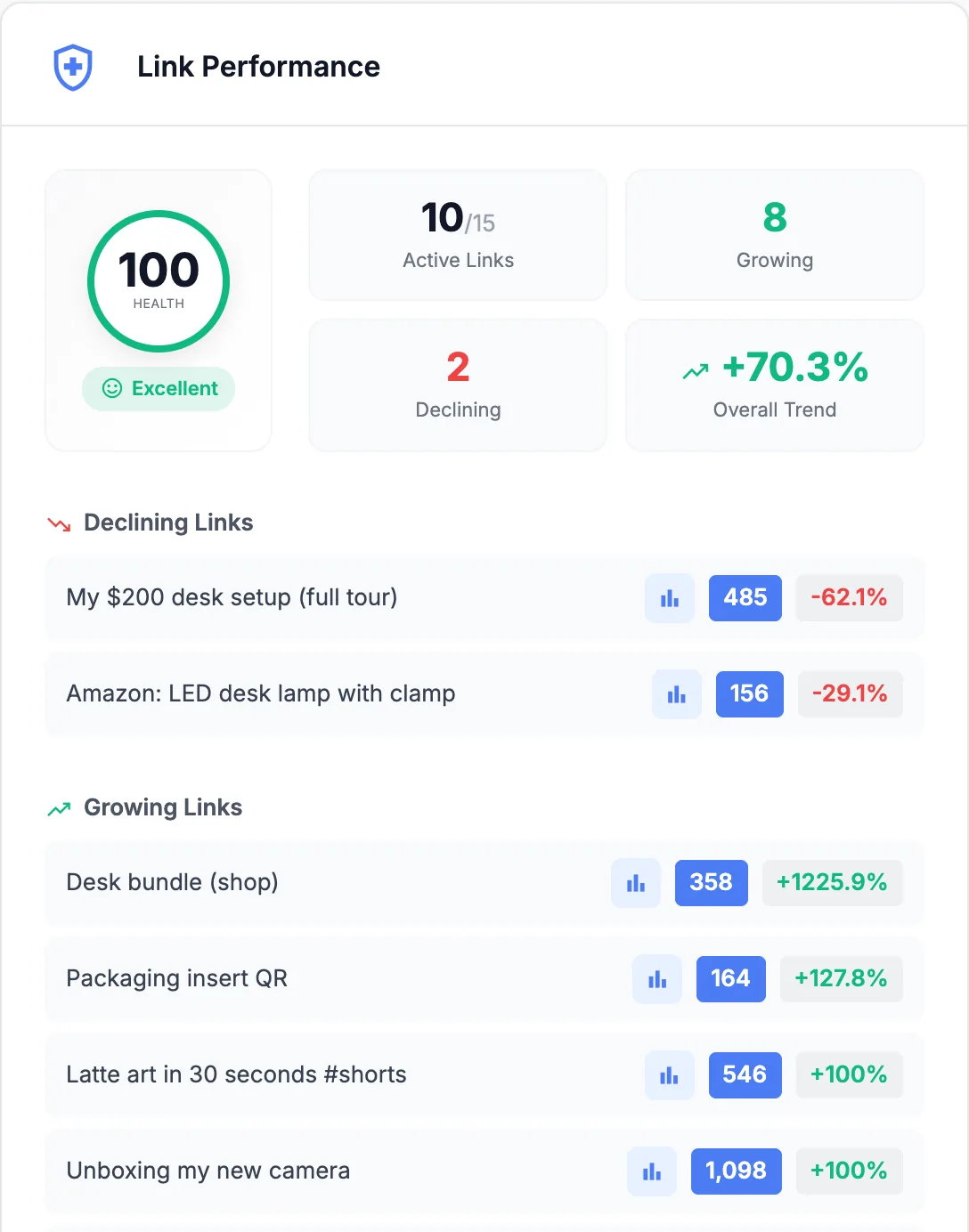
Link Performance

A health score from 0 to 100, rated Excellent, Good, Needs Attention or Poor. Next to it: how many links got clicks, how many are growing or declining, and the overall trend against the previous period of the same length. Below, the links that fell and the links that rose.

In this example

The desk tour video from August is down 62% while the new camera video, the Shorts and the shop page climb. The next Story should point at what is growing.

Link Performance card: health score 100 rated Excellent, 2 declining links and 8 growing links

Click Activity

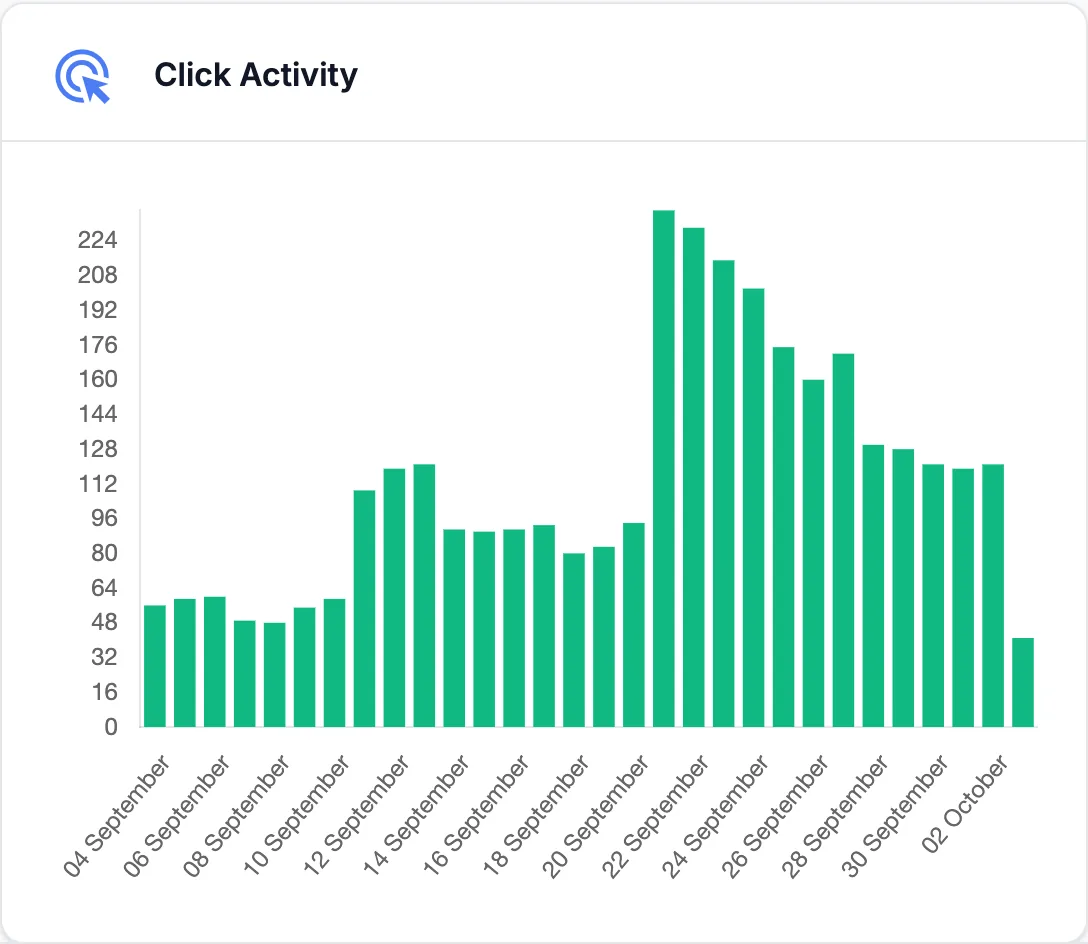
Clicks per day for the range you pick, so the day a post took off stands out. A second chart, Links Created, shows the links you made each day.

In this example

The jump on September 21 is the day the camera unboxing video went up. Traffic stayed higher for two weeks after it.

Click Activity chart with clicks per day for 30 days and a jump on September 21

Top Referrers

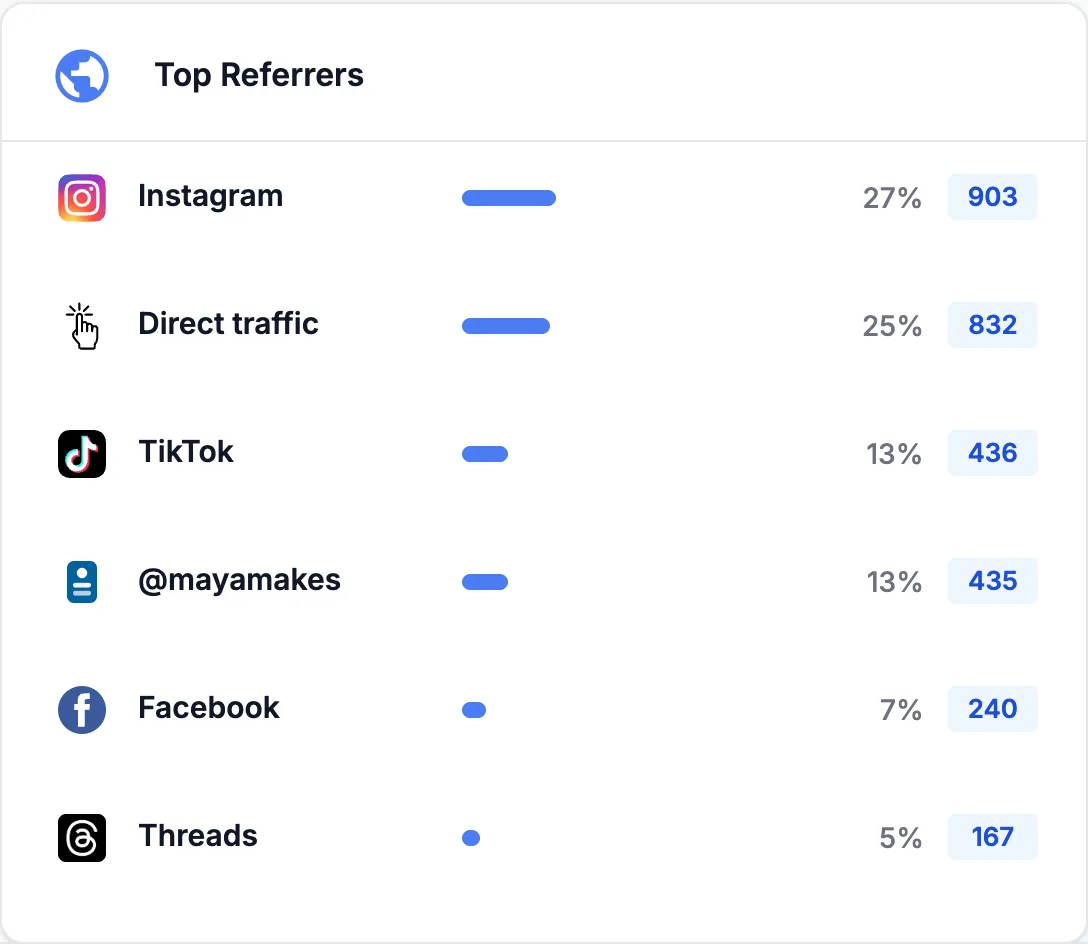
The apps and sites your clicks came from, each under one clear name. Taps on your LinkTwin bio page show as your @name, and Direct covers clicks that arrive with no referrer, like bookmarks, emails and typed URLs.

In this example

Instagram sends the most clicks, then direct taps, TikTok and the @mayamakes bio page.

Top Referrers card listing Instagram, direct traffic, TikTok, the @mayamakes bio page, Facebook and Threads

Countries and cities

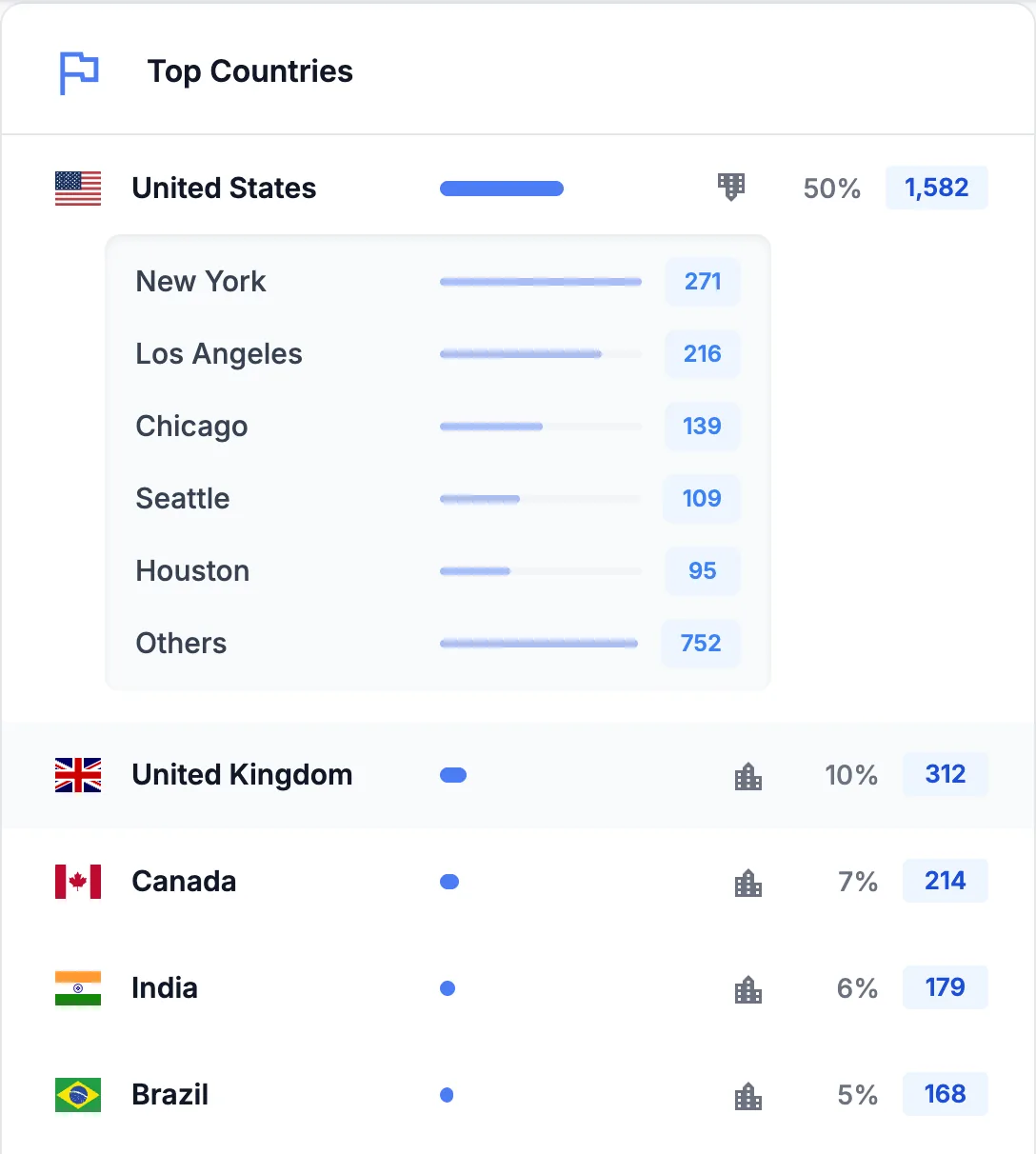
Where your visitors are. Every country has a View cities button that opens its top cities, and the Visitor Map shows the same clicks on a world map.

In this example

Half of the clicks come from the United States, led by New York and Los Angeles. The United Kingdom and Canada come next.

Top Countries card with the United States opened to show New York, Los Angeles, Chicago, Seattle and Houston

Browsers

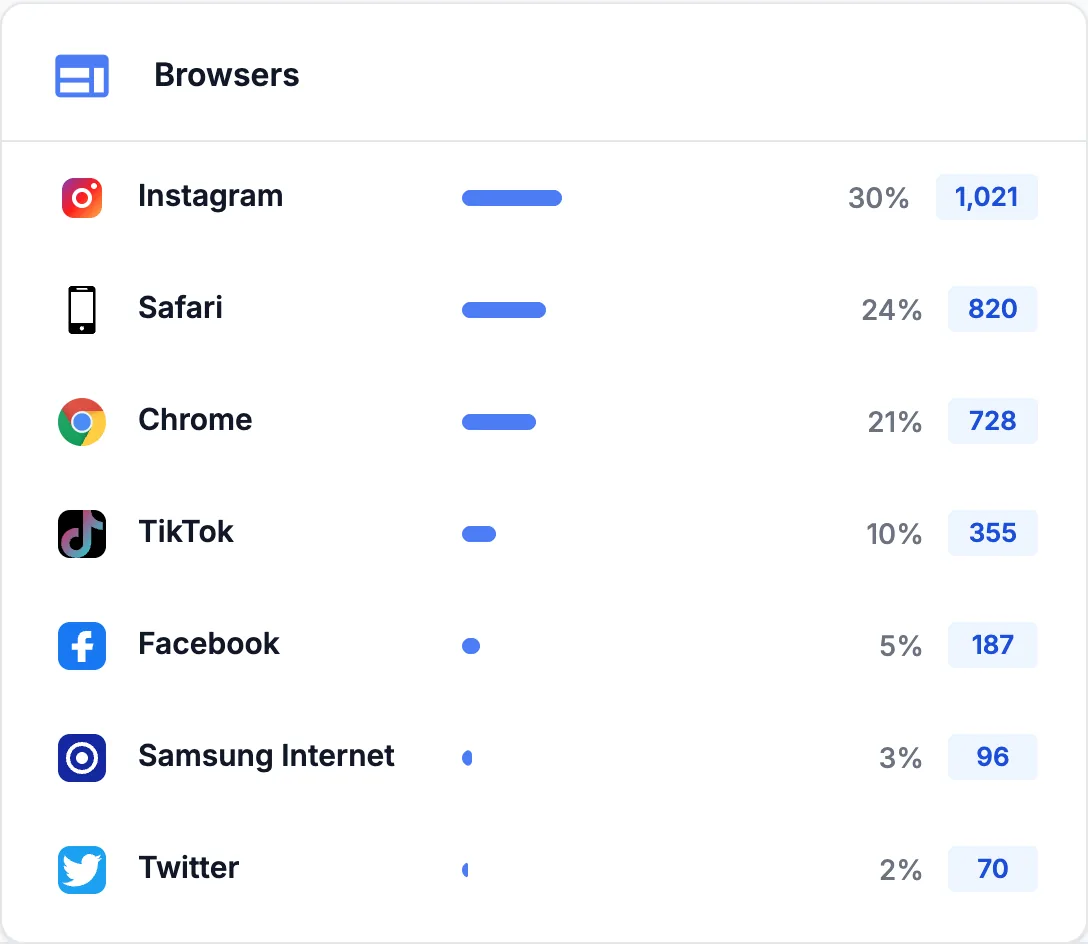
The browser each click opened in, including the in-app browsers of Instagram, TikTok, Facebook and X.

In this example

Most taps happen inside Instagram's own browser, where your visitor is not signed in to anything. That is why LinkTwin opens your links in the right app. See how it works.

Browsers card led by the Instagram in-app browser, then Safari, Chrome and TikTok

Devices

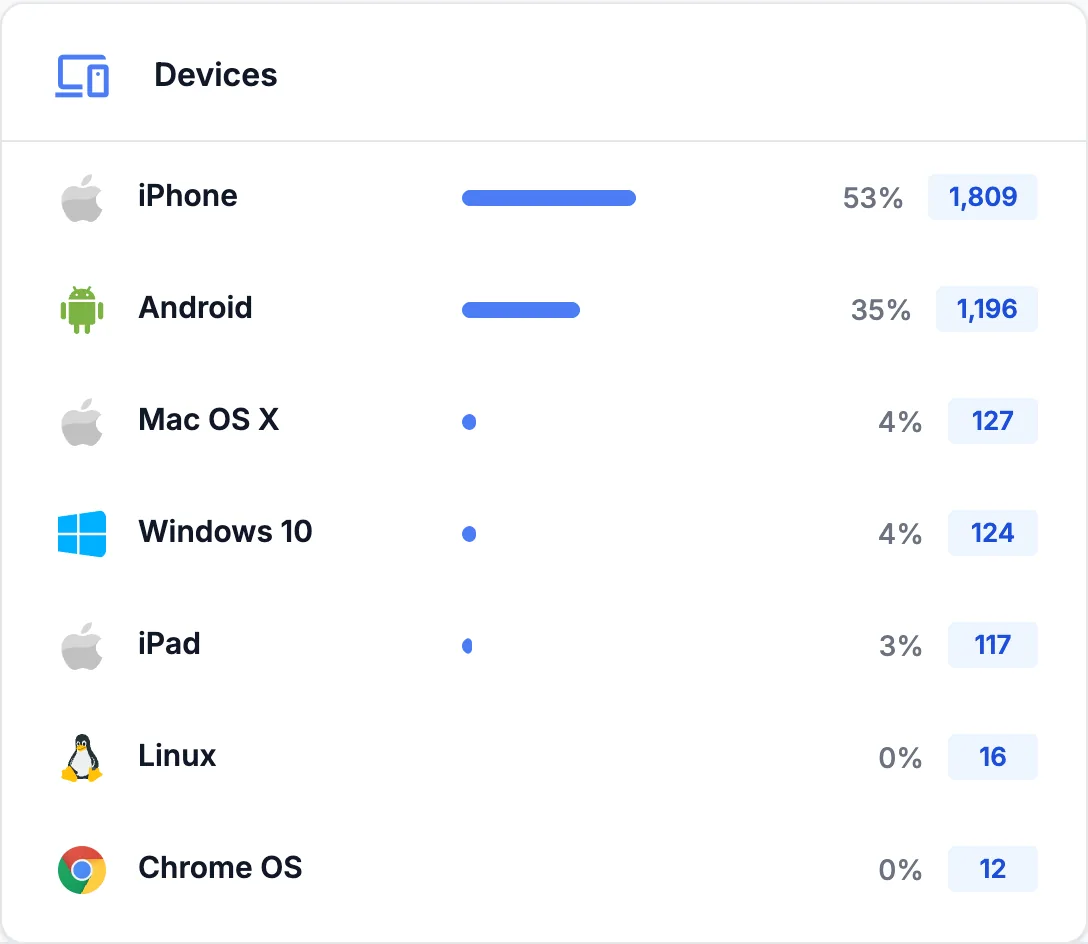
The operating system behind each click: iPhone, Android, iPad, Mac, Windows, Linux and more. It shows the platform, not the phone model.

In this example

88% of the clicks come from phones: 53% from iPhones and 35% from Android.

Devices card: iPhone 53%, Android 35%, then Mac OS X, Windows 10 and iPad

Peak Traffic Hours

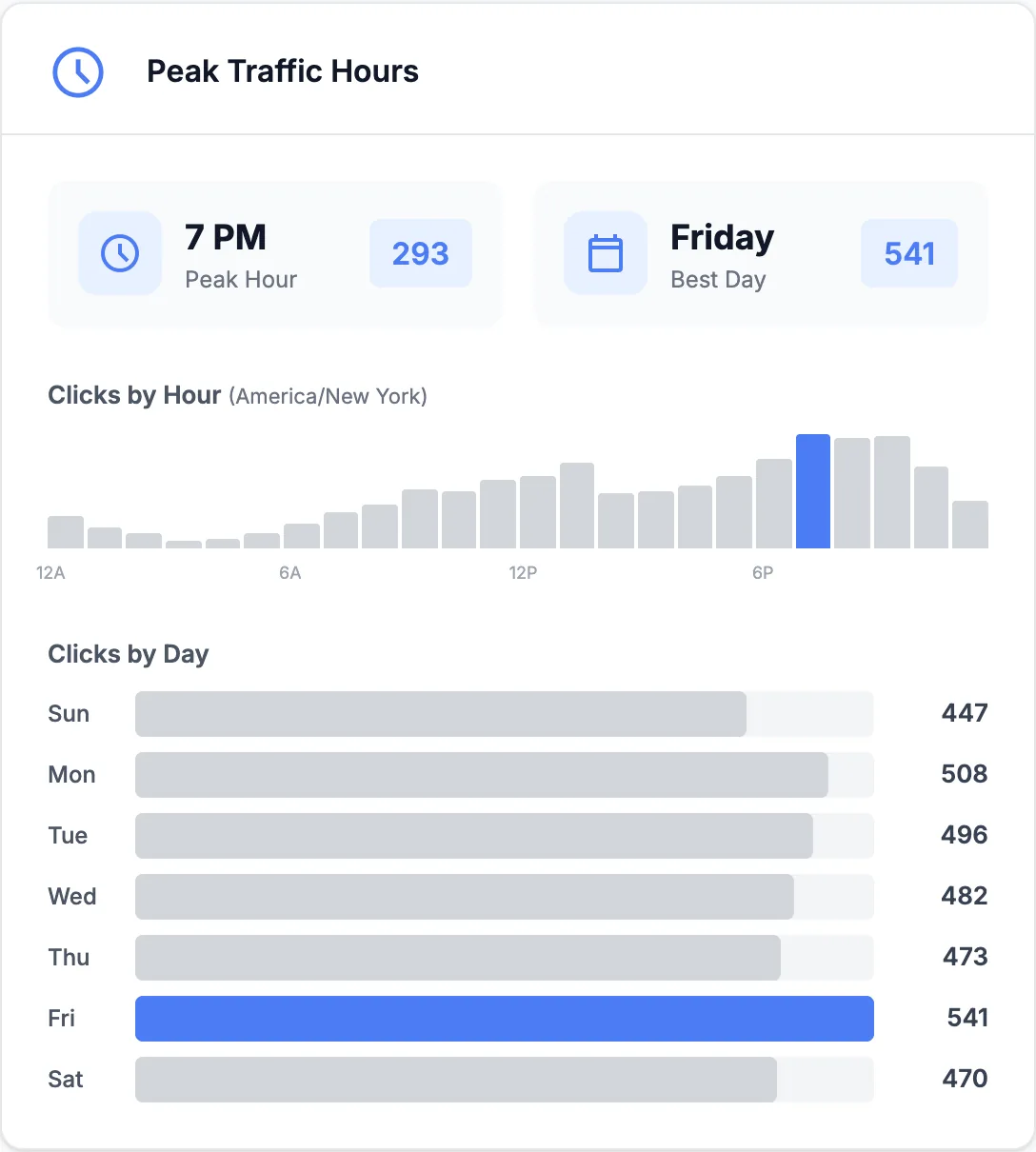
Clicks by hour of the day and by day of the week, in the time zone set on your account, with your peak hour and your best day.

In this example

Clicks peak at 7 PM New York time and Friday is the best day, so that is when the next video goes out.

Peak Traffic Hours card: peak hour 7 PM, best day Friday, with clicks by hour and by day of the week

Referrer names

Know which app sent every click

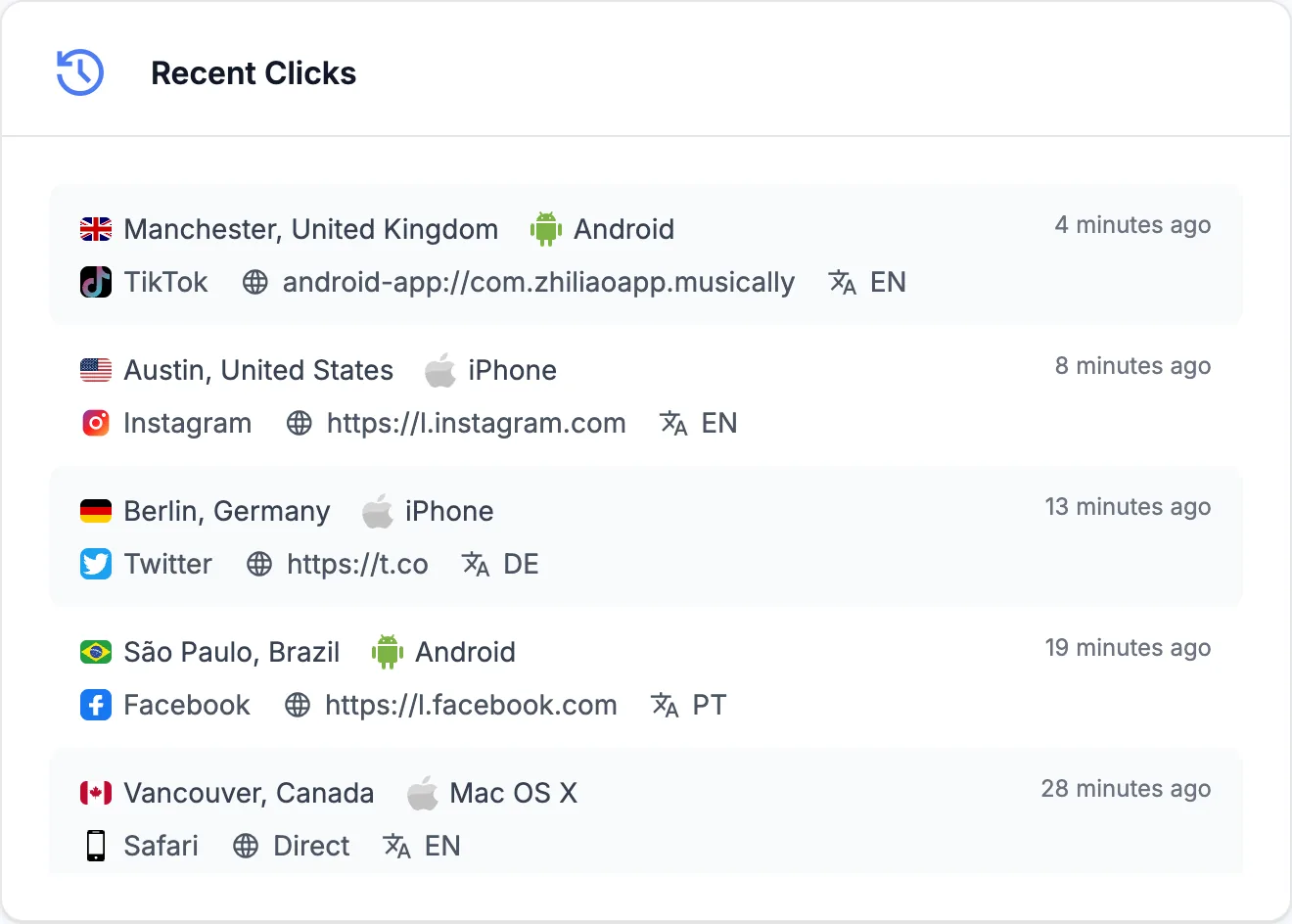
Apps announce themselves in messy ways. A tap in Instagram can arrive as l.instagram.com, and the same tap from Instagram's Android app as android-app://com.instagram.android. LinkTwin puts them under one name, so your Instagram row counts both.

  • Android appsTaps from Android apps are named after the app instead of a package id.
  • Your bio pageClicks on your LinkTwin bio page show as your @name, not as linktw.in.
  • DirectBookmarks, emails, typed URLs and anything else that sends no referrer.

Named sources include Instagram, Facebook, TikTok, Threads, X, YouTube, YouTube Music, Google, Gmail, LinkedIn, Snapchat, Pinterest, Reddit, WhatsApp, Telegram, Bing, Linktree, ManyChat, Canva and Stan Store.

  • l.instagram.com Instagram
  • android-app://com.instagram.android Instagram
  • android-app://com.zhiliaoapp.musically TikTok
  • l.facebook.com Facebook
  • android-app://com.facebook.katana Facebook
  • l.threads.net Threads
  • t.co X (Twitter)
  • m.youtube.com YouTube
  • android-app://com.google.android.gm Gmail
  • linktw.in/@mayamakes @mayamakes
  • (no referrer) Direct traffic

Share stats

Share your link stats with a public link

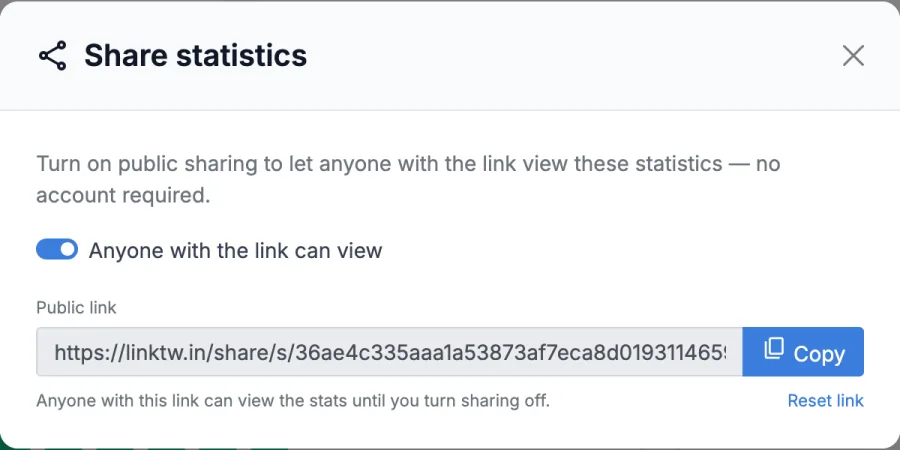
Sending results to a brand or a client? Open a link's stats, click Share stats and turn on public sharing. Anyone with the link sees that link's statistics without a LinkTwin account.

  • Works for single links, collections and bio pages
  • The shared page shows statistics only, with nothing to edit
  • Turn sharing off at any time, or reset the link to retire the old address
  • Included on every plan

Your account dashboard and campaign stats stay private.

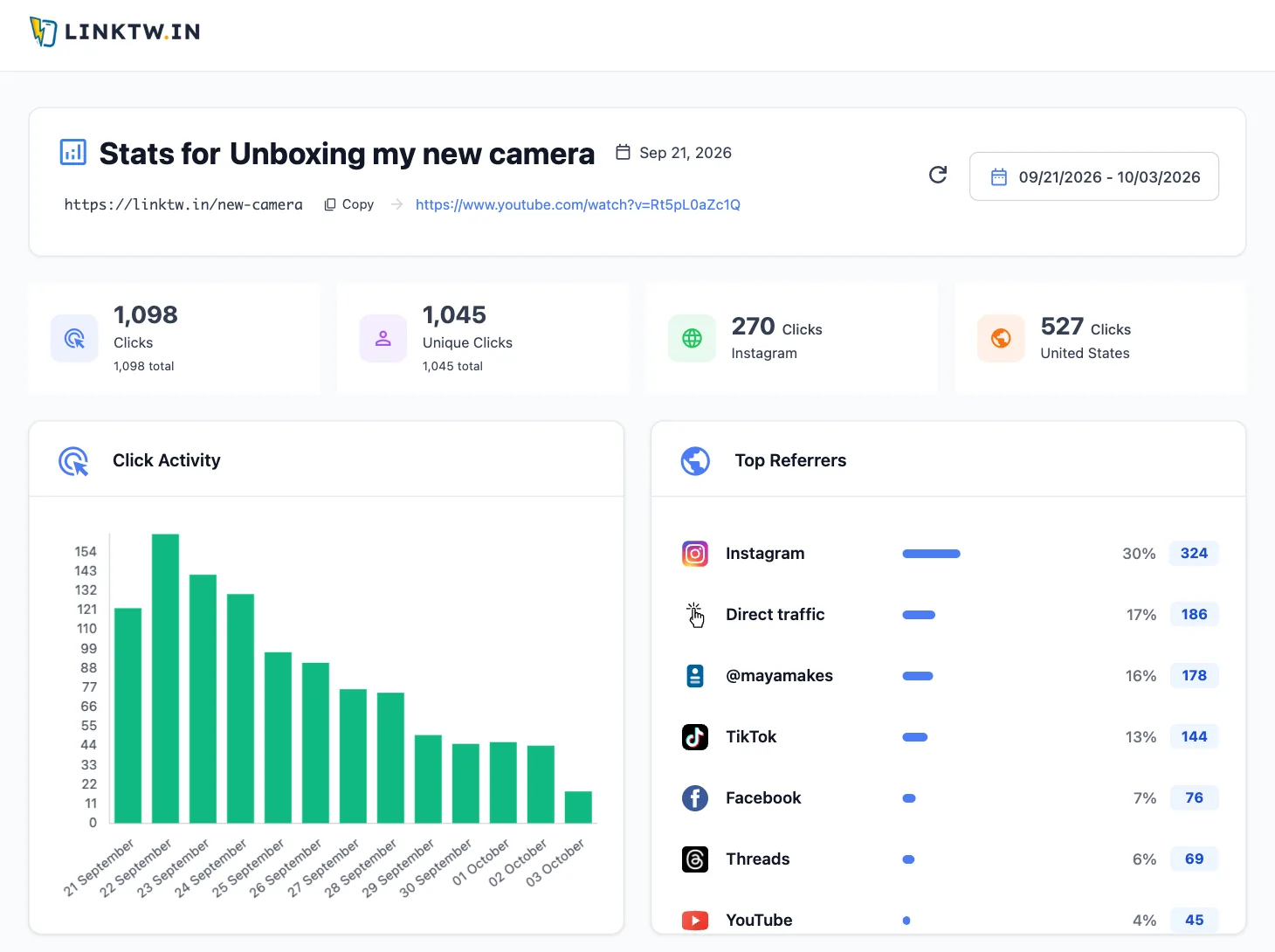
A shared stats page as a visitor sees it, with clicks, unique clicks, the click chart and top referrers of one link
The Share statistics window with public sharing turned on and the public link ready to copy

More reports

Reports for campaigns, collections, QR codes and bio pages

Group links the way you work and get one report for the group, or take the raw clicks with you.

Collection stats Included on every plan

Put links in a collection and get one report for all of them: total clicks, top country and referrer, clicks over time, a map with cities, browsers, platforms, languages, social sources and a click-by-click activity table. Collections can be shared and exported too.

Campaign stats Included on every plan

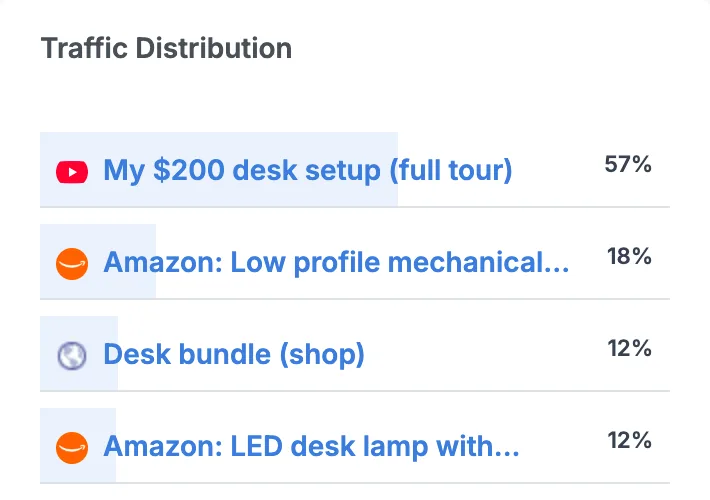
A campaign gets its own report: a clicks chart, how traffic splits between its links, a visitor map, top countries, browsers and platforms, plus Export Stats.

Traffic Distribution card of a campaign: the desk tour video 57%, a keyboard 18%, a shop page 12% and a desk lamp 12%

QR code scan tracking

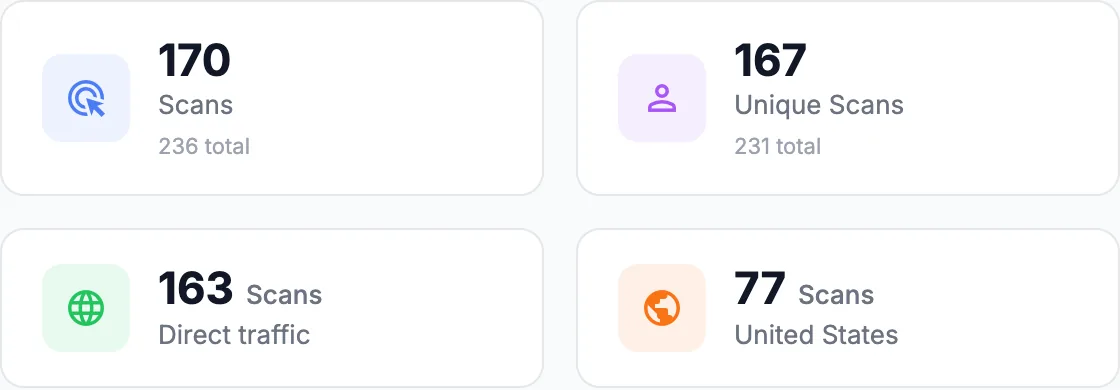
A LinkTwin QR code points to a tracked link. Its stats page counts Scans and Unique Scans, with the same countries, devices and times as any link.

QR code stats: 170 scans and 167 unique scans in the range, mostly direct, top country United States
QR code generator

Bio page stats

Your bio page reports its views and the clicks on each button, with the click-through rate, social icon clicks, referrers, countries, devices, languages and recent clicks.

CSV export Included from the Medium plan

Download clicks as a CSV file, one row per click. Export a single link, a date range of your account, a collection or a campaign.

What gets counted

Real taps in, bots out

Numbers are only useful when they count people. Before a click reaches your stats, LinkTwin checks where it came from.

  • Bots and crawlersKnown bots, and the crawlers apps send to build link previews, are left out, judged by their browser signature.
  • Blocked trafficClicks from IP addresses and networks on LinkTwin's click blocklist are not counted.
  • Unique clicksThe first click from an IP address is a unique click. Repeat taps add clicks, not unique clicks.
  • Your time zoneDaily charts and peak hours follow the time zone in your account settings.
Incoming clicks Example data
  1. GooglebotSearch crawler Not counted
  2. Toronto · AndroidFrom Instagram Click, unique
  3. Link previewCrawler fetching a chat preview Not counted
  4. Toronto · AndroidSame visitor, 2 hours later Click
  5. Blocked networkOn the click blocklist Not counted
  6. London · iPhoneQR code scan Click, unique

In your stats: 3 clicks, 2 unique clicks.

Click analytics on every plan

Every plan, including Free, tracks every click. Paid plans keep a longer click history. A/B testing comes on every plan, group reports on every plan and CSV export from the Medium plan.

Feature Free and Small Medium and Large
Click tracking on every link Included Included
Statistics dashboard for your account Included Included
Per-link stats and Recent Clicks Included Included
Share stats with a public link Included Included
QR code scan stats Included Included
A/B Testing Split Included Included
Collection and campaign stats Included Included
CSV export Not included Included

How far back your click history goes depends on the plan. Plans can change, so the pricing page always has the current details.

Loved by Creators & Marketers

See What People Are Saying

Join thousands of creators, affiliates, and marketers who use LinkTwin every day.

Click tracking questions

Still wondering about something? Ask us directly.

How do I track clicks on a link?

Paste the link into LinkTwin and share the short link you get. Every click is counted automatically, with no code or tracking tag to add. Open Statistics to see all your links together, or a link's own stats page to see one. You can also add a + to the end of any of your short links to open its stats.

What is the difference between clicks and unique clicks?

Clicks counts every tap. Unique clicks counts each IP address once, so a person who taps your link three times from the same connection adds 3 clicks and 1 unique click. People who share a network, like an office or a school, can share one IP address.

Can I see which app or website sent my clicks?

Yes. Top Referrers groups referrers under clear names such as Instagram, TikTok, Facebook, Threads, X and YouTube, including taps that come from Android apps. Clicks from your LinkTwin bio page show as your @name. Clicks that arrive without a referrer, like bookmarks, emails, typed URLs and most QR scans, show as Direct.

Can I share my link stats with someone who has no account?

Yes. Open a link's stats, click Share stats and turn on public sharing. Anyone with the link can view those statistics without a LinkTwin account. You can turn sharing off or reset the link at any time. It works for links, collections and bio pages.

Can I export my click data to CSV?

Yes. CSV export comes from the Medium plan. Each row is one click with the short URL, the date and time in your time zone, city, country, browser, platform, language, referring domain and full referrer. You can export a single link, a date range of your whole account, a collection or a campaign.

Are bots counted as clicks?

Known bots and crawlers, including the crawlers apps use to build link previews, are filtered out, and so are clicks from networks on LinkTwin's click blocklist. Filtering works from the visitor's browser signature, so, as with any link tracker, an unusual automated visit can still get through.

Does LinkTwin show clicks by country, city and device?

Yes. Every dashboard shows your top countries with a city breakdown, a visitor map, browsers and devices. Devices are grouped by operating system or platform (iPhone, Android, iPad, Mac, Windows and so on), not by phone model.

Is there a free link tracker?

Yes. Every LinkTwin plan, including the free plan, tracks clicks on every link and includes the Statistics dashboard, per-link stats and public stats sharing. Paid plans add a longer click history. A/B testing comes on every plan, and CSV export comes from the Medium plan.

How long does LinkTwin keep my click history?

It depends on your plan. The free plan keeps 14 days of click history, higher plans keep a longer history, and the date picker offers the ranges your plan covers. See the pricing page for each plan's limits.

Do QR code scans show up in my analytics?

Yes. A QR code made with LinkTwin points to a tracked link, so every scan is counted. Its stats page calls them Scans and Unique Scans and shows the same countries, devices and times as any other link. Make one with the QR code generator.


Do more with every tracked link

Click analytics come with every LinkTwin link. These tools build on them.

Link shortener

Short, clean links for anything you share

See the link shortener

Pricing

Compare plans and click limits

See pricing

Start tracking your next link

Paste the link you were going to share anyway. You get a short link with click analytics in seconds, for free.

Free plan. No credit card. Stats on every link.