Link in bio
Instagram, TikTok and YouTube bios have room for one link. Make it the one that works on every phone.

App Store link generator
Promoting an app? Share one short link instead of two badges. iPhone and iPad users land in the App Store, Android users in Google Play, and Mac, Windows and Chromebook users in their own store when you add it. Everyone else gets your website.
Free on every plan No credit card. Works in bios, ads, emails and QR codes.
Used by Alex Hormozi, Dan Koe, Matt Gray and 50,000+ creators
Sends visitors to
The two-badge problem
Most apps are promoted with a pair: a Download on the App Store badge and a Get it on Google Play badge, or two links in a bio. Each visitor has to find the one for their phone first.
Android users tap the App Store link and land on a page with nothing to install. Laptop visitors get a phone store. And a bio, a Story sticker or a printed QR code only has room for one link, so part of your audience gets the wrong store.

How it works
LinkTwin looks at the device behind each tap and sends it to the store you set for it, in a fraction of a second. Nobody sees a menu or picks a badge.
Tap a device to replay its route, or switch a store off to see where those visitors go instead.
 linktw.in/maya-appOne App Store Link
iPhone goes to App Store. The App Store opens on your listing, for iPhone and iPad alike.
Replay a device
Stores on this link
On phones the store opens in its own app. Huawei AppGallery is used only when the phone identifies itself as Huawei or HarmonyOS and the link also has Google Play; any other Android gets Google Play.
Supported stores
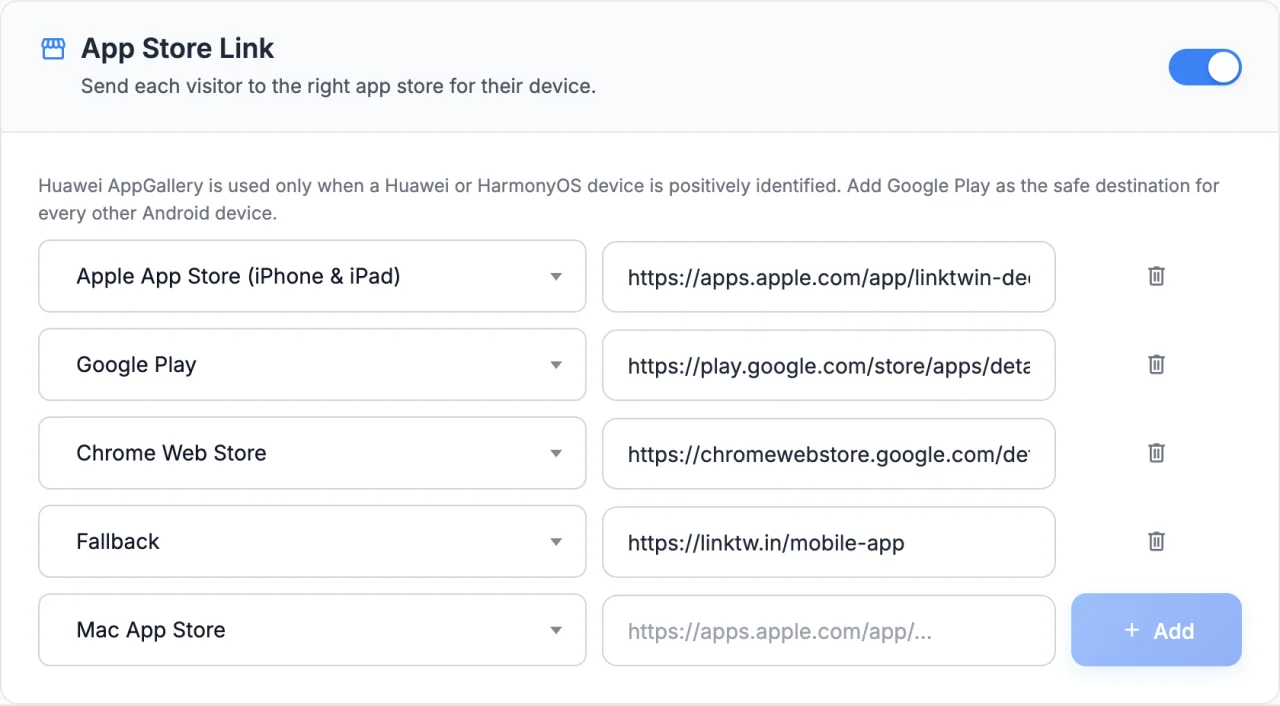
Add the stores your app is in and skip the rest. You paste each listing URL yourself, so every visitor lands on the exact page you chose.
Who lands hereiPhoneiPad
Paste a link likeapps.apple.com/app/…
One URL covers iPhone and iPad.
Who lands hereAndroid phones and tablets
Paste a link likeplay.google.com/store/apps/…
Also where any Android phone goes when it is not clearly a Huawei.
Who lands hereHuawei and HarmonyOS phones
Paste a link likeappgallery.huawei.com/app/…
Used only on phones that identify as Huawei, and only with Google Play set too. The AppGallery app opens directly.
Who lands hereMac
Paste a link likeapps.apple.com/app/…
Paste your macOS listing. Any apps.apple.com URL is accepted.
Who lands hereWindows PCs
Paste a link likeapps.microsoft.com/detail/…
For apps you list in the Microsoft Store.
Who lands hereChromebook
Paste a link likechromewebstore.google.com/detail/…
Handy for Chrome extensions and apps on ChromeOS.
Linux, unknown devices and any device whose store you skipped go here: your website, a download page or a landing page. No fallback? They get the store link you started with.
yourapp.com/download
Setup
No code and no developer. The short link stays the same, so you can switch it on for a link you already shared.
Paste your App Store or Google Play URL into LinkTwin, like any other link. AppGallery, Microsoft Store and Chrome Web Store listings work too.
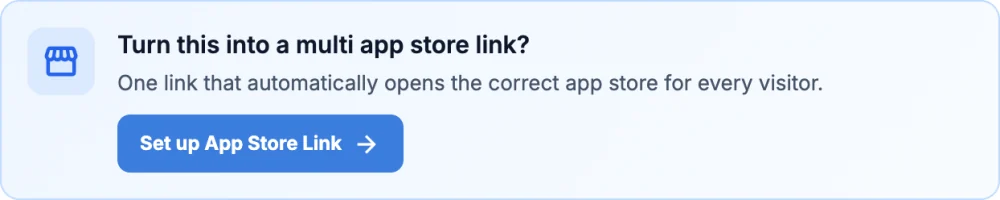
LinkTwin spots the store listing and offers to turn it into a multi app store link. Later, you find the same switch in the link's settings.
Pick a store, paste its URL and tap Add. Add a fallback page for everyone else, then save.
QR code for app download
Print one code on packaging, posters, flyers, menus or receipts. The code holds your short link, so every phone that scans it gets its own store: the App Store on iPhone, Google Play on Android, AppGallery on Huawei phones.
Make a branded code for your link in the QR code generator.
Where to use it
One link fits the places that only have room for one, and the places where you never know which phone is on the other end.
Instagram, TikTok and YouTube bios have room for one link. Make it the one that works on every phone.
A link sticker in a Story, a link in a caption or a pinned comment. One link, whoever taps it.
Boxes, labels, posters, receipts and table tents. One printed code covers every phone.
One Download the app button in your newsletter or welcome email, instead of two badges.
Send traffic ads and boosted posts to one link instead of splitting the audience by platform.
One Get the app button on your site. Phones go to their store, and Mac, Windows and Chromebook visitors get theirs too when you add them.

App Store Link is part of every LinkTwin plan, the free one too.
Works inside Instagram
On iPhone, Instagram's built-in browser won't open the App Store. A plain App Store link tapped in a bio, a Story or a DM just sits there.
An App Store Link spots Instagram on iPhone and moves the visitor to their browser first, usually Safari. The App Store opens from there, right on your listing.
This uses the Open in External Browser setting, which is on by default. In TikTok, LinkTwin shows its usual two-tap guide for opening the link in the browser.
More about Instagram's in-app browser.
Analytics
Every tap is counted like any LinkTwin click, with country, city, device, operating system, browser, language and referrer. The device and OS split shows how many taps came from iPhone, Android, Mac or Windows.
LinkTwin counts taps, not installs. Install numbers stay in App Store Connect and the Google Play Console.
See everything click analytics shows.
| Device | Taps | Store |
|---|---|---|
| iPhone | 397 | Apple App Store |
| iPad | 99 | Apple App Store |
| Android | 508 | Google Play |
| Huawei | 50 | Huawei AppGallery |
| Mac | 87 | Mac App Store |
| Windows | 74 | Microsoft Store |
| Chromebook | 12 | Chrome Web Store |
| Linux | 13 | Fallback URL |
Example data Your stats show taps by device and OS. The store column follows the routing you set.
A simple OneLink alternative
Mobile measurement platforms, such as AppsFlyer with its OneLink links, are built to attribute installs and to open screens inside your app, which means adding their SDK to your app. If you only need one link that gets every visitor to the right store, App Store Link does that on its own.
| What you get | Two store links | A redirect script on your site | Attribution platform links | LinkTwin App Store Link |
|---|---|---|---|---|
| One link for every phone | Visitors pick one | While someone maintains it | Yes | Yes |
| Setup | Nothing to set up | A developer writes device detection | Their SDK in your app, then link setup | Paste your store URLs |
| Mac, Windows and Chromebook stores | More badges | If you code them | Depends on the platform | Mac App Store, Microsoft Store, Chrome Web Store |
| Huawei AppGallery | Another badge | If you code it | Depends on the platform | For phones that identify as Huawei |
| Tapped inside Instagram on iPhone | The App Store link stalls | Stalls too, unless you handle it | Depends on the platform | Moves to Safari, then the App Store opens |
| Short link and QR code | Two of each | Your own URL | Yes | Yes, and your own domain from the Medium plan |
| Install attribution and in-app deep links | No | No | Yes, that is their main job | No. It opens the store listing |
| Cost | Free | Developer time | Depends on the plan | Free on every plan |
When an attribution platform fits
Pick a mobile measurement platform when you track installs per campaign, or want links that open a specific screen inside your app after install. Plan for the SDK work.
When App Store Link fits
Pick App Store Link when one link has to work in bios, ads, emails and QR codes, without an SDK, a developer or a bill. It sits next to the rest of LinkTwin: short links, QR codes, custom domains and stats.
Everything about one link for the App Store, Google Play and the other stores. Still wondering about something? Ask us directly.
It turns your app's store listings into one short link. LinkTwin checks the device behind every tap and sends iPhone and iPad users to the App Store, Android users to Google Play, and Mac, Windows and Chromebook users to their own store when you add one. Everyone else goes to your fallback page.
Create a LinkTwin link with your App Store or Google Play URL. In the window that confirms your link, tap Set up App Store Link, or open the link's settings and switch on App Store Link. Paste the other store URL, save, and share the short link.
Yes. App Store Link is included in every LinkTwin plan, the free plan too. Your plan's usual monthly click and link limits still apply. See plans and limits.
Six: the Apple App Store for iPhone and iPad, Google Play, Huawei AppGallery, the Mac App Store, the Microsoft Store and the Chrome Web Store, plus a fallback URL for everything else. Other stores, such as the Amazon Appstore or the Samsung Galaxy Store, can't be added.
Macs go to the Mac App Store, Windows PCs to the Microsoft Store and Chromebooks to the Chrome Web Store, if you added them. Linux, unknown devices and any device whose store you skipped go to your fallback URL. Without a fallback, they get the store link you started with.
Add an AppGallery URL and a Google Play URL. Phones that identify themselves as Huawei or HarmonyOS go to AppGallery, where the AppGallery app opens, and every other Android phone goes to Google Play. AppGallery can't be saved without Google Play, so no Android visitor is left without a store.
On iPhone, Instagram's built-in browser blocks the App Store, so LinkTwin first moves the visitor to their browser and the App Store opens from there. This uses the Open in External Browser setting, which is on by default. In TikTok, LinkTwin shows its usual two-tap guide for opening the link in the browser.
Yes. Make a QR code for the link and print it on packaging, posters or flyers. The code holds your short link, so every phone that scans it is sent to its own store, and you can change the store URLs later without reprinting. Try the QR code generator.
LinkTwin shows every click by device, operating system, country, browser and referrer, so you can see how many taps came from iPhone, Android or a computer. It doesn't record which store a visitor was sent to and it can't see installs. Install numbers live in App Store Connect and the Google Play Console. More about click analytics.
It opens your app's store listing. On phones the store app opens, and if your app is already installed the store offers to open it. App Store Link does not jump to a screen inside your app.
An App Store Link is a LinkTwin link, so everything else works on it too.
Paste your App Store or Google Play link to start. Add the other stores in the link's settings.
Free on every plan · No credit card · Six stores and a fallback
 mayamakes
 @mayamakes