
 Tracking & Analytics
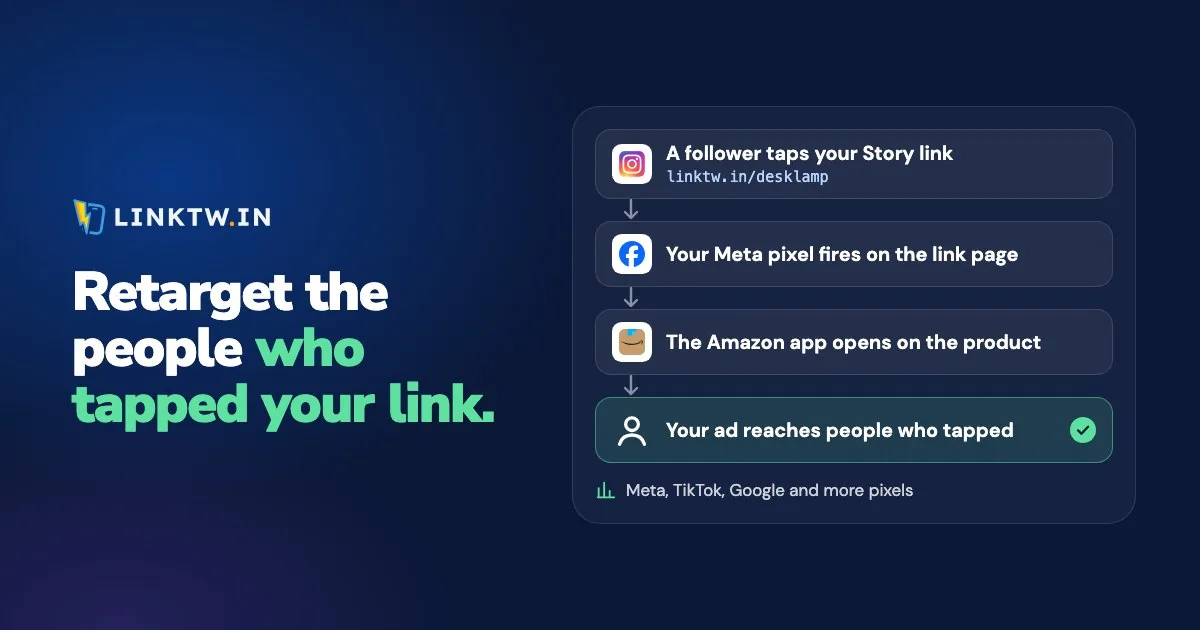
Amazon and YouTube won't let you paste a pixel into their pages, so put your Meta, TikTok or Google pixel on a short link you control instead. Someone taps it, the link page records the visit for your ad platform, and then the destination opens in its app when that app is installed.
That's how you retarget people who tapped your Amazon picks or your latest video. LinkTwin fires your pixel on a short link to YouTube, Amazon or Spotify, then opens that app, where your follower is already signed in. You paste an ID, not the platform's install code.
Where each pixel ID lives
| Platform | Paste this | Where it is |
|---|---|---|
| Meta (Facebook, Instagram) | Pixel ID, numbers only | Events Manager, under your data source |
| TikTok | Pixel ID | TikTok Ads Manager: Tools, then Events |
| Google Ads | The send_to value: AW-, your conversion ID, a slash, and the label |
Goals, then Conversions, in the conversion action's event snippet |
| Google Analytics 4 | Measurement ID, starts with G- |
Admin, Data streams, your web stream |
| Google Tag Manager | Container ID, starts with GTM- |
Your container in Tag Manager |
The same list also takes LinkedIn, X (listed as Twitter), Pinterest, Snapchat, Reddit, Microsoft Advertising (listed as Bing), Quora and AdRoll.
What the pixel records, and what it misses
A plain Amazon or YouTube link never hits a page you own, so your pixel hears nothing. With the pixel on the short link, the tap loads LinkTwin's link page, the pixel records a visit, and the app opens.
The pixel sees the tap. It doesn't see a purchase, a subscribe, or anything that happens after the app opens. Those numbers stay in Amazon or YouTube. The link page waits for the pixel scripts to load, so there's a short pause. A link with no pixel skips that page and opens right away. A blocked pixel never stops the link.
You don't need a pixel for a click count. Every LinkTwin link already has a report with clicks over time, country, device, browser and source (how to track link clicks walks through it). A pixel is the next step: it lets you reach those people again.
Attach the ID to the link
Pixels are available on every plan.
One link can fire several pixels at once. The setup is the same on a YouTube, Amazon or Spotify link.
- Copy the ID from the table above. Leave the install snippet where it is.
- Save it in LinkTwin. In the dashboard, open Settings, then Tracking Pixels, and select Add Pixel. Pick the platform. Meta is listed as Facebook. Google Analytics 4 is listed as Google Analytics. Name it and paste the ID. For Meta, leave the conversion event on PageView unless another event honestly describes a tap.
- Tick it on the link. Paste the destination into the Create App Link box, open Advanced Options, and tick your pixels in the Pixels field. Links you already have take pixels on their edit page. Or tick a pixel on the Tracking Pixels page and choose Add to All Links.
- Share the short link in a bio, a Story, a video description or an ad. A LinkTwin bio page can fire the same pixels: choose them under Tracking pixels in the bio editor.
- Test it. Tap the link on your phone and on a computer, then look for the visits in your ad platform's Events Manager. Open the click report too. It counts every tap by country, device, browser and source, so you can see which links are worth an ad budget.
Meta: PageView, plus one event only if it's true
Every Meta pixel on a LinkTwin link records a PageView per tap. You can add one standard event on top. Pick it only when the name matches a tap, such as View Content for a product link. Don't send Purchase. Nobody has bought anything yet, and the ad account would count taps as sales.
If your pixel has a list of domains allowed to send it events, Meta calls that traffic permissions. Add linktw.in, plus linktwin.co if you use the TikTok setting (Optimize Links For TikTok), or your branded domain when that is the domain in the link.
Google Ads and Tag Manager
A Google Ads pixel on a link reports a conversion on every tap. Give it its own conversion action, something like "Link click", and set it as secondary so it's counted but doesn't steer your bids.
Tag Manager loads your whole container. Any tag set to fire on all pages fires on the link page too.
One audience first, then split by link
The pixel only collects visits; you build the audience in the ad platform. On Meta, create a website custom audience from your pixel and set a rule on the URL. URL contains linktw.in/your-link is everyone who tapped that one link. URL contains linktw.in is everyone who tapped any of your short links on that domain. A branded domain works the same way: use the domain that's actually in the link.
Google Ads calls these audiences data segments. TikTok lists them as Website Traffic custom audiences.
Each platform wants a minimum before you can target the group. Meta doesn't publish a figure. TikTok asks for 1,000 matched users before an ad group can use it. Google Ads wants 100 active visitors in the last 30 days for Display, Search and YouTube.
One link rarely gets there on its own. Put the same pixel on all your links. Add to All Links does it in one step. Build one audience from every tap, and split it by link once the numbers are there.
Why the audience is smaller than your clicks
Your audience will usually be smaller than your click count. Here's where the difference goes:
- Blockers. Brave blocks third-party trackers out of the box, and ad blockers do the same in other browsers. A blocked pixel sends nothing. The link still opens.
- Safari. Apple's tracking prevention blocks third-party cookies and limits how long cookies set by scripts last, so platforms recognize fewer of the people who tapped.
- In-app browsers. A tap inside Instagram or Facebook loads the link page in that app's browser, which may not share cookies with Safari or Chrome. Meta may not recognize someone it knows perfectly well in those browsers. If you run Meta ads, read link clicks versus landing page views before you compare the two.
- Consent and matching. Visitors who decline consent aren't added. TikTok counts only visits it can tie to a TikTok account.
The click count comes from a different system. See why link clicks don't match your ad platforms for the gaps.
Consent still applies on a link page
A pixel on a link page follows the same rules as a pixel on your website. Meta's Business Tools Terms and Google's EU user consent policy make you responsible for consent where the law requires it, such as in the EU and the UK. In California, the CCPA lets people opt out of their data being shared for cross-context advertising, which is what retargeting is. None of this is legal advice.
Common questions
Can I add a pixel to an Amazon affiliate link?
Yes. The pixel fires on LinkTwin's link page, and the Amazon link itself stays as it was: the tap goes on to the product with your saved Associates tag, and Amazon never receives your pixel. Your disclosure still goes next to the link, as affiliate disclosure for creators explains.
Can I add a pixel to a YouTube link?
Same steps. The pixel records the tap, then YouTube opens in the app when it's installed, or in the browser when it isn't. The pixel doesn't see subscribes, likes or watch time.
Can one link fire a Meta pixel and a TikTok pixel?
Yes. Tick every pixel you saved. A bio page can use the same set.