
 Instagram, TikTok & In-App Browsers
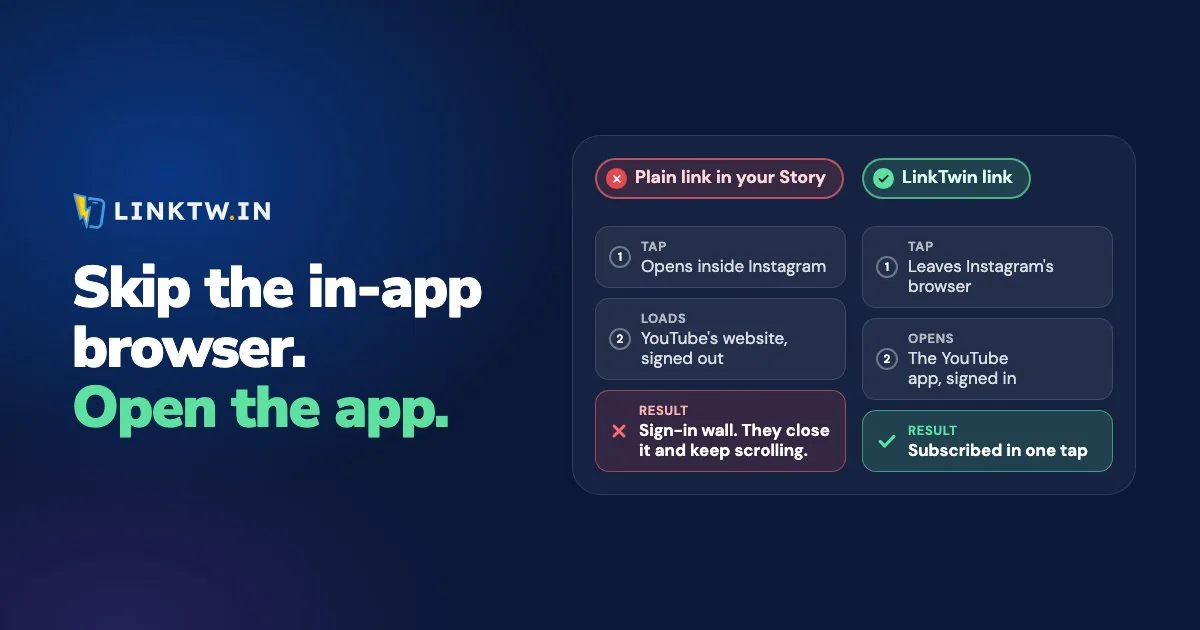
An in-app browser is a web browser built into another app. When someone taps a link inside Instagram, TikTok, Facebook or X, the page opens in that app's own window, with the app's bar still on screen, instead of in Safari, Chrome or the app the link points to.
Instagram sets this as the default: a link tapped in a post, an ad, a Story or a message opens in its in-app browser (Instagram's page on in-app browsing). For you, the person who posted the link, that's where the trouble starts. A follower taps the YouTube link on your Story, the video loads in a small window where they aren't signed in, and Subscribe asks for a Google password few people bother to type for a channel they found thirty seconds ago.
A LinkTwin link opens YouTube, Amazon, Spotify and 100+ other apps straight from a tap in Instagram, in the app where your follower is already signed in. A link to an ordinary website goes to the phone's own browser instead, where saved logins and cards live. Nobody on the other end installs anything or changes a setting, because the app-opening link does the work on the tap.
Cookies and sign-ins inside an in-app browser
An in-app browser keeps its own cookies, separate from Safari's and Chrome's. The logins a person saved in their real browser usually aren't in it, and neither are their saved cards. So the same follower can be signed in to the YouTube app and signed out of YouTube in Instagram's window at the same moment, and a shop checkout, a Buy Now button or a comment box starts at a sign-in form.
Some sign-ins fail outright. Google announced in 2021 that it blocks Google account sign-in inside embedded web views, the component these browsers are built on, so a Continue with Google button may not work there.
Apps do this because a tap that stays inside the app keeps the person one swipe from the feed. Instagram's menu has an Open in external browser option, but it moves one page, once, and most people never look for it. Nothing you set on your own account reaches your followers' phones, so the fix belongs on the link you post, and that's what the Instagram link opener is for.
What a LinkTwin link does in each app
A plain link opens as a web page in every one of these apps. A LinkTwin link does the following instead, by where it's tapped. App links are YouTube, Amazon, Spotify and the rest of the supported list. Website links are ordinary pages, your own shop included.
| Tapped in | Link to an app | Link to a website |
|---|---|---|
| Instagram (bio, Stories, posts, DMs) | Opens the app directly | Opens in the phone's browser |
| Threads | Opens the app directly | Opens in the phone's browser |
| Facebook on Android | Opens the app directly | Opens in the phone's browser |
| Facebook on iPhone | One tap on LinkTwin's bridge page, then the app | Opens in Safari automatically |
| X on Android | Opens the app directly | Stays inside X |
| TikTok (iPhone and Android) | No automatic escape. A full-screen guide to TikTok's own menu: the three dots, then Open in browser. After those two taps, the app opens | The same two taps, then the browser |
| Email, texts, QR codes, a normal browser | Opens the app directly | Opens normally |
X on iPhone works a little differently. An app link shows LinkTwin's page first, one tap opens the app, and if nobody taps within 5 seconds the page carries on inside X. Anywhere in the table, if the destination app isn't installed, the link falls back to the web page.
Links to your own website or shop are included on every paid plan.
In-app browsers, app by app
- Instagram: a YouTube, Amazon or Spotify link you post opens in Instagram's window, and why Instagram links don't open the app shows what to change on the link itself.
- Where the tap can happen: a URL in a caption or a comment isn't clickable for most accounts, so every clickable spot on Instagram matters as much as the link you pick.
- Story link stickers: a sticker can be missing, refuse your URL or open a signed-out page, and an Instagram link sticker that isn't working tells the three apart.
- TikTok: no link leaves TikTok's browser on its own, and why TikTok links stay in TikTok shows the screen your viewers get and the setting that keeps your links reliable there.
- YouTube: a video link can land on the website for two different reasons, and YouTube links not opening in the app sorts out which one you have.
- Facebook: a link tapped in the Facebook app opens inside Facebook as well, and Facebook links that open in the browser covers what a posted link can do on iPhone and Android.
- Meta ads: if you pay for traffic, the in-app browser shows up first as the gap between link clicks and landing page views.
- WhatsApp: a chat link on Instagram should land in the chat, not on a web page, and a WhatsApp link on Instagram shows how to get there.
- Your bio page: the buttons on a link-in-bio page open inside Instagram too, unless the page is built to open apps from your link in bio.
A link that opens a screen inside an app instead of a web page is a deep link, and what a deep link is explains it with examples.
Post a link that leaves the in-app browser
- Paste the URL you already share (a YouTube video, an Amazon product, a Spotify track) into the Create App Link box in your dashboard. You can try the same paste in the deep link generator first.
- Copy the short link and post it where people tap: your Instagram bio, a Story sticker, DMs, a Facebook post, X, and in emails, texts and QR codes.
- Test it from inside the app, on a phone that has the destination app. Safari or a computer never meets an in-app browser, so a test there tells you nothing about what your followers see.
- Open click analytics for clicks over time, country, device, browser and where each tap came from. LinkTwin counts clicks, not sales.
It's free to start: the free plan includes 10 links and 500 clicks a month.
Common questions
Is an in-app browser the same as a web view?
Close enough. A web view is the building block an app uses to show web pages inside itself, and the in-app browsers in Instagram, Facebook and TikTok are built on one. That's why rules written for web views, like Google's sign-in block, apply inside them.
Does changing my default browser stop in-app browsers?
No. A default browser is where the phone sends links that leave an app. Instagram, TikTok and Facebook don't send them out in the first place, so the next tap still opens inside the app. Changing the link is what changes the tap.