
 Amazon & Affiliate Marketing
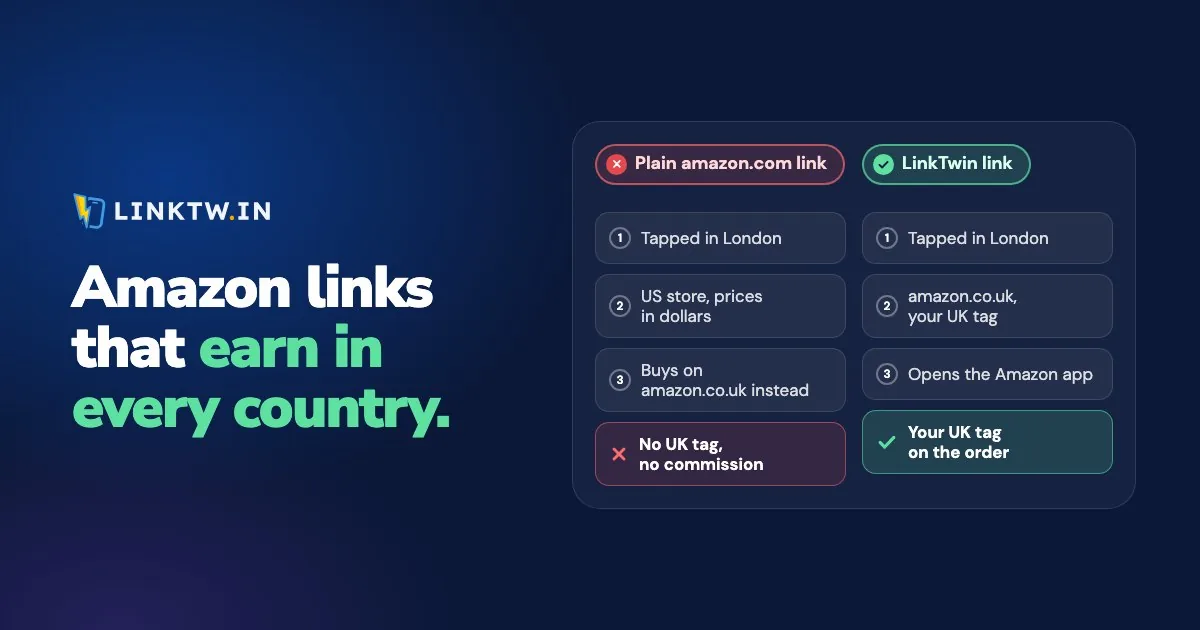
An Amazon affiliate link only earns in the store whose Associates program issued your tag. A viewer in Germany who taps your amazon.com link, sees dollar prices, and buys the same item on amazon.de later doesn't bring your tag to that order. To earn from an international audience, join the Associates program of each country your followers shop in, and post a link that sends each shopper to their own store with the right tag.
A LinkTwin link makes that switch on the tap: it reads the shopper's country, opens that country's Amazon store, one of 23, with the tag you saved for it, and opens the Amazon app when it's installed. Amazon link localization lists the stores and where each country goes.
Amazon's own answer is OneLink. It's free (OneLink FAQ), and as of November 2026 Amazon's UK help lists it for 14 Associates programs. A US Associate can reach 13 other stores with it: Canada, the UK, Spain, Germany, France and Italy with the US store ID, and Japan, Singapore, the Netherlands, Saudi Arabia, Poland, Sweden and Australia through linked accounts with their own tracking IDs. It was built for Amazon's own links on your website, and Amazon's OneLink FAQ for Canada and Europe is clear about the rest:
Shortened links created by third-party link shorteners are currently not supported and will not be redirected.
Amazon's pages make no promise about links in an Instagram bio, a Story or a YouTube description either. That's where the link itself has to pick the store. OneLink's list also leaves out India, Brazil, Mexico and the UAE, which are among LinkTwin's 23 stores.
What happens on each tap
LinkTwin reads the country from the IP address at the moment of the tap. A viewer in Berlin on your amazon.com link lands on amazon.de with your German tag, in the Amazon app if it's installed. A viewer in Dallas on the same link stays on amazon.com with your US tag. Because the shopper is already in the right store, the order can start from your click, which is what Amazon's 24-hour cookie counts from.
Nobody is sent to a store where you can't earn: a shopper from a country where you haven't saved a tag gets the store in the link you pasted, with its tag. Countries without their own Amazon store go to a nearby one when you've saved a tag for it: Portugal to amazon.es, Austria and Switzerland to amazon.de, New Zealand to amazon.com.au. The full country map is on the localization page.
OneLink and LinkTwin, side by side
| Question | Amazon OneLink | LinkTwin |
|---|---|---|
| Who can use it | Associates in 14 programs, per Amazon's UK help (November 2026) | Anyone who saves an Associates tag for each store, starting from a link to any Amazon store |
| Stores it reaches | 13 besides the US, for a US Associate | 23, including India, Brazil, Mexico and the UAE |
| What you set up | A few clicks for six stores with your US store ID. Seven more need linked accounts and their own tracking IDs | Join each program, then save each tag once |
| Links it handles | Amazon full and short links on your site, per Amazon's FAQ for Canada and Europe, which adds that third-party short links aren't redirected | Its own short links, such as linktw.in/desk-lamp, wherever you post them |
| Product missing in that store | A close match or a local search by default, or exact matches only | Same product page in the new store, with no availability check |
| Opens the Amazon app | Amazon's pages don't say | Yes, when it's installed |
| Reports | Associates reports in each country | Clicks by country, device and source. Orders stay in each Associates report |
TikTok is the exception to the app row: no link opens an app from inside TikTok on its own, and why links stay in TikTok explains what LinkTwin shows there instead.
When that store doesn't sell the product
Catalogs don't match from country to country. OneLink handles a missing item with a preference you set per tracking ID: by default it looks for the same or a similar product in the local store and falls back to a local search, or you can ask for exact matches only.
LinkTwin keeps the product page and changes the store and the tag. amazon.com/dp/B0EXAMPLE1 becomes amazon.co.uk/dp/B0EXAMPLE1 with your UK tag. It doesn't check whether that store sells the item, so a product code that doesn't exist there lands on a missing page.
/dp/ from your best links and open it on each store you've joined. If one country doesn't sell it, add a Geographic Targeting rule on that link for that country, pointed at a similar product there or back at your original store. Targeting rules always win over automatic geolocation. Geographic targeting is available on every plan.Save your tags, then share one link
- Join the programs your audience actually reaches. The country breakdown in your LinkTwin click report shows where the taps come from. Join those programs on Amazon's Associates site.
- Save one tag per store. In Amazon Settings, add the tracking ID each program gave you. Saving a tag turns Auto-Geolocation on for that store, and you can switch it off for one store and leave the others on.
- Paste a full product link from the store you know best into the Create App Link box, then copy the short link.
- Share it with a visible Amazon label, like "Desk lamp on Amazon", and your disclosure beside it. Affiliate disclosure examples has wording for posts that reach more than one country.
- Read clicks and orders side by side. Put the country breakdown of your click report next to each country's Associates report.
Common questions
What if the shopper uses a VPN?
LinkTwin reads the country from the IP address at the moment of the tap, so a shopper on a VPN is sent to the store for wherever that VPN connects from.