
 Using LinkTwin
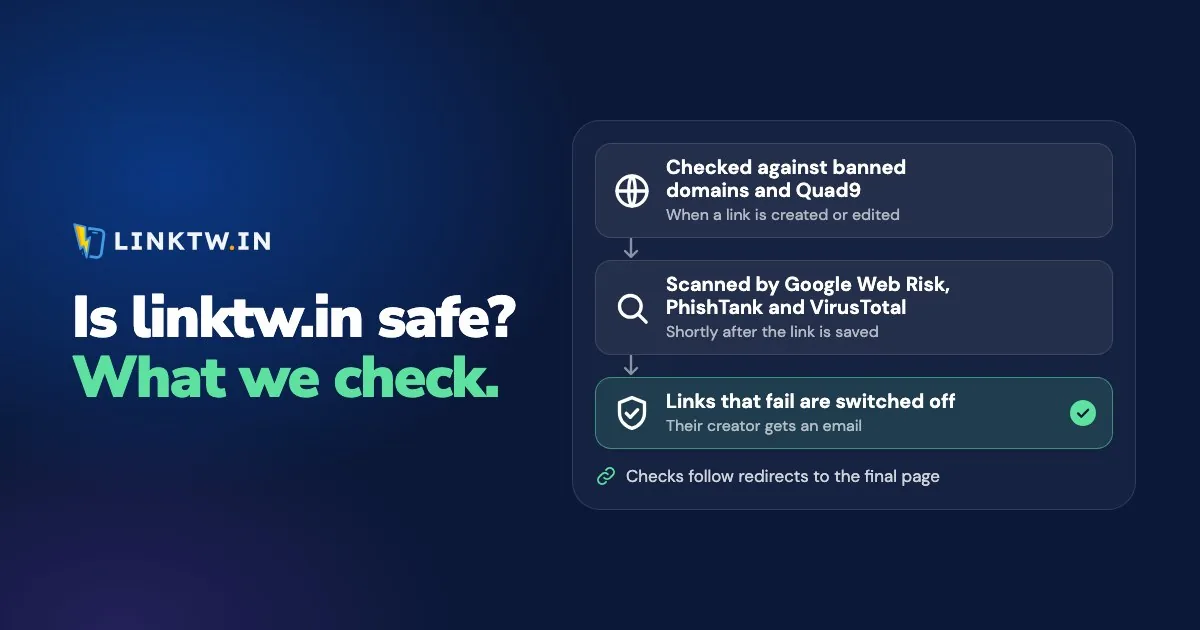
linktw.in is a legitimate short-link address run by LinkTwin LLC, a company based in the United States. We check links for malware and phishing and switch off the ones that fail, but no check can vouch for every page a creator decides to link, so judge where a link lands the way you'd judge any link from the person who sent it.
LinkTwin is a link tool for creators: a linktw.in link opens what the creator shared (a YouTube video, an Amazon product, a Spotify song) in that app when it's on your phone, and in your browser when it isn't or when the link goes to a website. Creators use it because Instagram and Facebook open links inside their own browser, where you're usually not signed in to anything.
What happens when you tap a linktw.in link
LinkTwin looks at your phone and at the app you tapped in, then sends you on. It doesn't install anything on your phone and doesn't read your list of installed apps directly: it opens apps through the standard links each app supports, as our privacy policy describes.
Sometimes a short LinkTwin page shows up first, naming the app, with a button such as Open in YouTube. It tells you where you're headed before anything opens, and some apps need it before they let a link out of their in-app browser. Inside TikTok, a LinkTwin screen may ask you to open the link in your browser from TikTok's own menu, because TikTok keeps links inside TikTok.
You may also see LinkTwin links on linktwin.co, our second domain, which creators use for links they post on TikTok, or on a creator's own domain connected to LinkTwin. They work the same way and go through the same checks.
How LinkTwin checks links
Links to a short list of well-known sites skip the scanners. Other destinations are sent to these checks:
| Check | When it runs | What happens to a link that fails |
|---|---|---|
| Our own list of banned domains | When a link is created or edited, and when a short link (not a QR code or bio page) is opened | It can't be created. An existing short link shows an “Unsafe Link Detected” page instead of the destination. |
| Quad9, a DNS service that blocks known malicious domains | When a link is created or edited | It can't be created |
| Google Web Risk, PhishTank and VirusTotal | Shortly after the link is saved; if there's no answer, it's retried later | It's switched off, and its creator gets an email |
| A report from you | When you send one | We check the page and block the link if it breaks our terms |
The checks follow a link to where it really ends. If a creator shortens another short link, or an address that redirects somewhere else, we check the final page too. The same goes for every other destination a link can send people to, such as a different page for visitors from another country.
Failed checks at creation and in the background are recorded against the account. When a link is switched off, that account's other links are queued for a check, and accounts that keep adding harmful links can be suspended, which stops every link they made.
How to judge a link before you trust it
Scanners know about threats someone has already found. A scam page that went up an hour ago may not be on any list yet, and a real shop can still sell you something that isn't worth the money. A short link also hides its destination until you tap it, so the checks that help most happen on your side:
- Who sent it. A link in the bio of a creator you follow is one thing. A message from a stranger about a parcel, a prize or a locked account is another, whatever address it uses.
- Where it lands. A link that promised a YouTube video should open YouTube. If you get a sign-in page, a download or a warning that your phone is infected instead, close it.
- What it asks for. Don't type a password or a card number on a page you reached from a link you didn't expect. Open the app or type the site's address yourself.
How to report a linktw.in link
If a linktw.in or linktwin.co link led you to spam, a scam, malware or a fake login page, report it to us. The form asks for three things:
- The full short link, starting with https://, copied from the post or message.
- The reason: spam, fraudulent, malicious or phishing.
- Your email, in case we need more details.
We check the page the link sends people to. If it breaks our terms, we block the link so it stops sending anyone there.
What LinkTwin records when you tap
To count the tap for the creator, LinkTwin records your IP address, the country it comes from and the city when it can be located, your device and operating system, your browser and its language, and the site or app the tap came from. Location is approximate, never GPS, and opening a link doesn't need an account. The creator sees where their clicks came from in a click report.
A link's owner can also add advertising pixels (Meta, Google, TikTok and others) to their links, so those companies may see the tap too. What you watch, buy or read after the tap happens in that app or on that site, and LinkTwin doesn't see it. The privacy policy covers the rest, including how long we keep data and how to ask us about it.
Common questions
What does “Unsafe Link Detected” mean?
We blocked that link because its destination may be harmful or breaks our terms, so nothing past that page opens. If you see “Inactive Link” instead, the link has been switched off.
I already typed a password on that page. What now?
Change that password from the real app or website, along with any other account that uses the same one, and turn on two-step sign-in where it's offered. Then report the link so we can block it for the next person.
If you're a creator, our link shortener makes the same kind of link for your own posts.