
 Tracking & Analytics
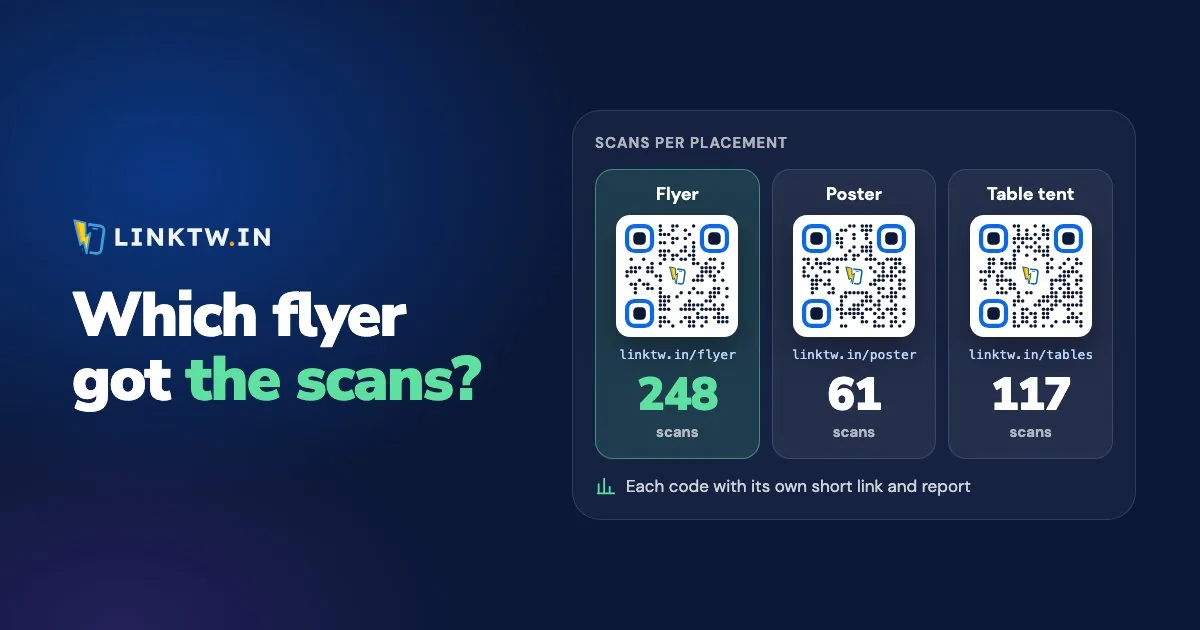
To track QR code scans, print a code that holds a short link instead of the final address: every scan passes through the link, which counts it and then opens the destination. Give each placement its own link and code, and every flyer, poster or table tent gets its own report of scans over time, country, city when it can be located, device and browser.
Say your band prints one code for the new album and puts it on 200 flyers, the poster in the venue's window and the card on the merch table. The scans come back as one number, nobody can tell which piece of paper earned them, and the next print order is a guess. Print three codes from three links instead, and each piece of paper reports on itself.
A LinkTwin QR code counts every scan on its own short link and, when the app is installed, opens Spotify, YouTube, Instagram or whichever app the link points to on the phone that scanned it. Every LinkTwin link comes with its QR code, so one link per placement is the whole setup.
What a QR code scan report shows
A scan lands in the link's report the same way a tap does: one row with the time and what the phone's request tells us. Open the report from Statistics in your dashboard, or, while you're signed in, add a + to the short link (linktw.in/album-poster+), and look here:
| What you want to know | Where the report shows it |
|---|---|
| How many times the code was scanned | Clicks, with the chart of clicks over time |
| About how many people scanned it | Unique Clicks |
| When people scan | Peak Traffic Hours: the busiest hour and day |
| Where they were | Top Countries, with the cities inside each country |
| iPhone or Android | Devices (the operating system, not the phone model) |
| Which placement works best | Each placement link's total, compared with the others |
Codes you design on the QR Codes page get a short link of their own, and their report says Scans and Unique Scans instead.
Unique clicks count each IP address once, which is closer to people than raw clicks but still counts connections. On a venue's guest Wi-Fi, a room full of phones can share one address, so at a gig or a conference the total can be the better number. Country and city come from the IP address, so they're approximate.
No report shows who scanned, because a scan carries no name. LinkTwin counts the scan, not what the person does once the app opens. The same fields work for every link you share, printed or not, and tracking link clicks explains each one, including how clicks and unique clicks differ.
Why every placement needs its own code
A QR code carries nothing that marks it as a scan. It's your short link drawn as squares, so a scan reaches LinkTwin as an ordinary visit to that link. Put the same link in your Instagram bio and on a poster, and the bio's taps and the poster's scans add up to one total that can't be pulled apart later. The source list won't sort them out either: scans typically land under Direct, the label for visits that arrive with no referring site, next to typed addresses and bookmarks.
So the fix isn't a setting. It's a separate link for each place the code appears, and then nearly every visit to that link comes from that print, including people who type the short address printed under it. For example:
- Flyers handed out at a show:
linktw.in/album-flyer - The poster in the venue's window:
linktw.in/album-poster - A card in every order you ship:
linktw.in/box-insert - Table tents, one link per shop:
linktw.in/tables-downtown - Event badges or a booth banner:
linktw.in/expo-badge - A code on a TV screen, in a video or a stream:
linktw.in/tv-endcard
Readable endings like these are available from the Medium plan.
A code on a TV is read from across the room, so a QR code in a YouTube video for TV viewers needs more size and screen time than one on paper.
The same goes for tracking scans per location. If a café puts table tents in three shops, three codes tell you exactly which shop's tables get scanned. The report's city column can't do that job, since it's worked out from the phone's connection and is only approximate.
What happens when someone scans
A scan with the phone's camera skips the in-app browser that catches link taps inside Instagram or Facebook. So a LinkTwin code opens the app the link points to: the album in Spotify, the video in YouTube, your profile in Instagram, where the person is usually already signed in and can follow, save or subscribe. A phone without the app gets the web page instead.
That's a deep link doing its job, the same kind of link you share in posts and bios, so your printed codes and your online links sit side by side in one dashboard.
Change where a printed code points
A code made from a LinkTwin link is what's called a dynamic QR code: unlike a static one, which spells out the final address and can't be counted or changed, it holds a short link you can repoint after printing.
Open the link, paste the new destination and save, and the next scan of last month's flyer opens this month's video. Scans keep adding to the same report, so the flyer's whole history stays in one place. Changing where a link points after you share it is included on every paid plan.
Set up tracked QR codes in LinkTwin
It's free to start: the free plan includes 10 links and 500 clicks a month.
- Create one link per placement. Paste the destination into the Create App Link box: a YouTube video, a Spotify album, an Instagram profile or your own site. Do it again for the next placement, even when the destination is the same. Links to your own website or shop are included on every paid plan.
- Download the code. Open the link, and its QR code is in the Quick Access panel, with a Download button for a PNG.
- Or design it. For your colors, a logo and your choice of dot and corner styles, make the code on the QR Codes page: choose Link, paste the destination, then download a PNG, SVG or PDF. Each code made there holds its own short link and its own report. Designed QR codes are available on every plan.
- Print it with a line of text. Under the code, say what the scan opens and print the short address for anyone who'd rather type it. Scan the proof with a phone before the full run, and keep in mind that this test scan can show up in the count.
- Read the results. Open the click report for each placement link and compare them once the print has had a week or two to work.
To show a venue or a sponsor how the poster did, choose Share stats on that link's report and turn on public sharing: they get a page with the numbers that opens without an account.
Common questions
Does a scan count when the app isn't installed?
Yes. LinkTwin counts the scan when the phone reaches the short link, before anything opens, so it's counted the same whether the app or the website opens next.