
 Tracking & Analytics
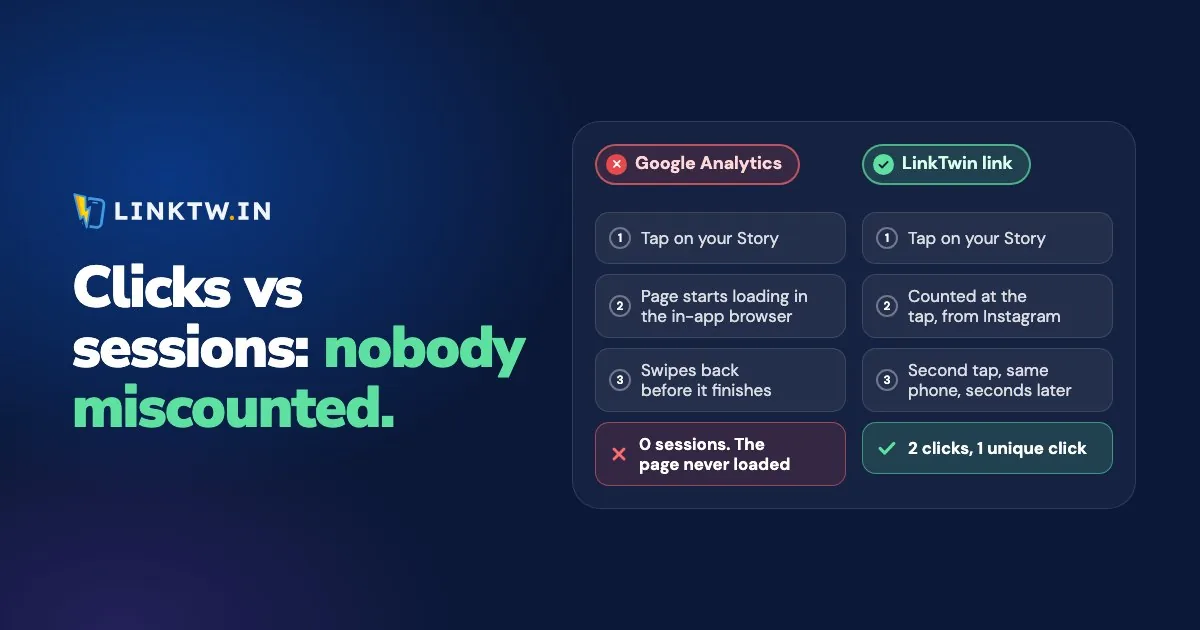
Link clicks and Google Analytics sessions don't match because they count two different moments. Your short link counts the tap, the instant a phone asks the short address where to go; Google Analytics counts a session only after your page has loaded and its tag has run, and it folds everything within 30 minutes into one session. Anyone who taps twice, leaves before the page appears, or blocks the tag widens the gap, and Google's own troubleshooting page gives the same reasons for its ad clicks.
Say a follower taps the link on your Story, the page is slow, they tap again, then swipe back to the feed. LinkTwin's Recent Clicks would list both taps: same city, same phone, Instagram, seconds apart. That's 2 clicks and 1 unique click, and Analytics would have nothing, because its tag never ran. LinkTwin counts every tap on your link the moment it happens, before your page loads, so its click report shows the people Analytics never got the chance to count.
Which number is higher tells you where to look:
- The link is higher: repeat taps, people who left before the page loaded, link-preview fetches, or a tag that never ran. Where to look.
- Analytics is higher: people came back later, or other links lead to the same page. Why sessions run ahead.
- The sessions are there, but under direct or unknown: the source got lost on the way. Why that happens.
What each number is counting
| Number | What it records | When |
|---|---|---|
| LinkTwin: Clicks | Each request for the short link, minus the bots and preview crawlers it recognizes | At the tap, before your page loads |
| LinkTwin: Unique Clicks | Each IP address once | The same moment, collapsed by IP |
| Google Analytics: Sessions | A visit to your site, which can hold several taps and ends after 30 minutes of inactivity | After the page has loaded and the Google tag has run |
Ad platforms add a third number. Meta separates a tap on the ad from a page that finished loading, and link clicks versus landing page views covers that pair. TikTok's Clicks (all) includes social interactions such as a tap on your name or profile photo, which never reach your link, so put Clicks (destination) next to the short link instead.
When the link count is higher than sessions
Repeat taps. The short link logs every request, while Analytics folds a leave and a quick return into one session. In the click report, the gap between Clicks and Unique Clicks is your repeat tappers.
People who leave before the page loads. A plain link tapped in Instagram or Facebook opens in that app's own browser, with the feed one swipe away. Plenty of people tap, wait two seconds and swipe back. The tap was real, but the page never finished, so the Google tag never ran.
Preview fetches. Paste a link into a post or a chat and the app requests it to draw the link preview card. LinkTwin filters out the bots and preview crawlers it recognizes, though an unusual automated visit can still slip through, as with any counter. Analytics runs a filter of its own and doesn't show you what it removed.
A tag that never ran. An ad blocker, a declined cookie banner or JavaScript switched off each means a person reached your page and left no session. The short link is counted on LinkTwin's server, so none of that touches it.
When sessions run ahead
One tap, a long read and a return an hour later is one click and two sessions, since Analytics closes a session after 30 minutes without activity. Google even calls more sessions than clicks a sign of engagement. Sessions also arrive from links that aren't this short link: the newsletter, your website's menu, a friend who copied the final page address. A higher session count usually means people came back, not that the click report missed them.
Why clicks show up as direct or unknown
Google Analytics files a visit under (direct) / (none) when it doesn't have a clear referral source. Google's list of causes reads like a list of how creators share: links without UTM tags, redirects that strip the tags, URL shorteners such as bit.ly, typed addresses, links in PDFs and Word files, and ad blockers. "Unknown" or "none" in a link tracker is the same gap: the click counted, but nothing named the app or site it came from.
The reason is that a referrer, the note a browser adds to say which page a click came from, was built for web pages linking to web pages. Creators share from apps, inboxes, files and print:
| Where the tap starts | Referrer that arrives |
|---|---|
| A text, a chat app, a DM or a mail app | Usually none |
| A PDF, a Word file or a slide deck | None |
| A camera scan of a QR code | None. The camera opens the address on its own |
| Instagram, Facebook or Threads | At most the app's site, never the post or Story (browsers send only the site between sites) |
That's why Direct can be the biggest row after a launch that clearly got shared: links passed around in group chats and DMs (what marketers call dark social) arrive with nothing attached. You can't make a chat app or a camera send a referrer. You can stop needing one.
Give each place you share its own LinkTwin link: linktw.in/drop-story for the Story, linktw.in/drop-news for the newsletter, linktw.in/drop-box for the QR code on the box you ship. The link that was tapped names the placement, referrer or not, and a forward into a group chat still lands on the link you posted first. In each link's Top Referrers, a tap that brought no referrer is listed as Direct traffic, so you can set those aside before comparing. Recent Clicks also lists the browser next to the referrer, and in-app browsers name themselves, so a blank-referrer click that came through Instagram's or Facebook's browser still shows where it was tapped.
Like any redirect, a short link can drop the referrer on the hop into your own website, which is why Google lists shorteners among the causes. The fix is a source that travels with the visit: add UTM tags to the short link (linktw.in/drop-news?utm_source=newsletter&utm_medium=email): UTM Parameter Forwarding, on by default in Link Settings, passes them to your page, and Analytics files the visit under the source you named instead of direct.
Custom endings such as linktw.in/drop-news are available from the Medium plan.
Line up the days, then find the cause
Every tool cuts the day at its own midnight. A tap on Tuesday morning in Sydney is still Monday afternoon in an Analytics property set to New York. Use one time zone everywhere, and leave out the last two days, because Analytics data can take 24 to 48 hours to process. Then compare one link and one placement:
| What you see | Most likely cause | How to check |
|---|---|---|
| Clicks well above unique clicks | The same person tapped again | Recent Clicks: same city, device and browser, moments apart |
| Clicks from an app you didn't post in | Someone shared the link onward | Top Referrers |
| Many clicks, few sessions, mostly phones | People left before the page loaded | Open the page on a phone from inside the app you posted in, and time it |
| Few sessions on every device | The tag was blocked, or consent was declined | The cookie banner, and whether the Google tag is on the page |
| Sessions under direct or (not set) | The tags were lost in a redirect, or never added | Tap the link and read the address of the page that opens |
Make the comparison fair
No tool makes the two totals agree, but LinkTwin's click analytics gives you the click side in a form you can line up: clicks over time, country, city when it can be located, device, browser, and the source of each tap when the app passes one on.
- Give each placement its own link. Paste the page address into the Create App Link box once for the ad, once for the bio and once for the newsletter. A gap then shows up on one placement instead of hiding in a blended total. Links to your own website or shop are included on every paid plan.
- Match the clock. In Link Settings, set Timezone to the zone your Analytics property and ad account use.
- Tap it yourself, on your phone, inside the app where you posted the link. The tap should appear in Recent Clicks, and the visit in Analytics' Realtime report. If it shows in only one, you've found the gap.
- Compare finished days. Add a
+to the end of the short link (linktw.in/your-page+) to open its stats, pick the same dates you used in Analytics, and read Clicks next to Unique Clicks, then Top Referrers.
How to track link clicks goes through what each part of the click report is for. The free plan includes 10 links and 500 clicks a month.
Common questions
Which number should I trust?
Each answers its own question. Clicks say how many times the link was tapped, and from which app when a referrer was passed. Sessions say what people did after your page loaded. When the link opens the YouTube or Amazon app, there's no page of yours for a Google tag to run on, so the click count is the only number you have for that tap.
Is there a normal size for the gap?
Google's troubleshooting page lists reasons, not a normal percentage, so a figure quoted in a forum post is a guess about someone else's audience. A steady gap matters less than one that suddenly widens on one link, one placement or one day.