
 YouTube Creators
To promote your YouTube channel on Instagram, cut a Reel from the moment in your video that viewers rewatched, post a Story with a Link sticker on upload day, send the link in a DM when someone asks for it, and keep the channel at the top of your bio. Captions and comments aren't tappable for most accounts, so their job is to point people to those spots.
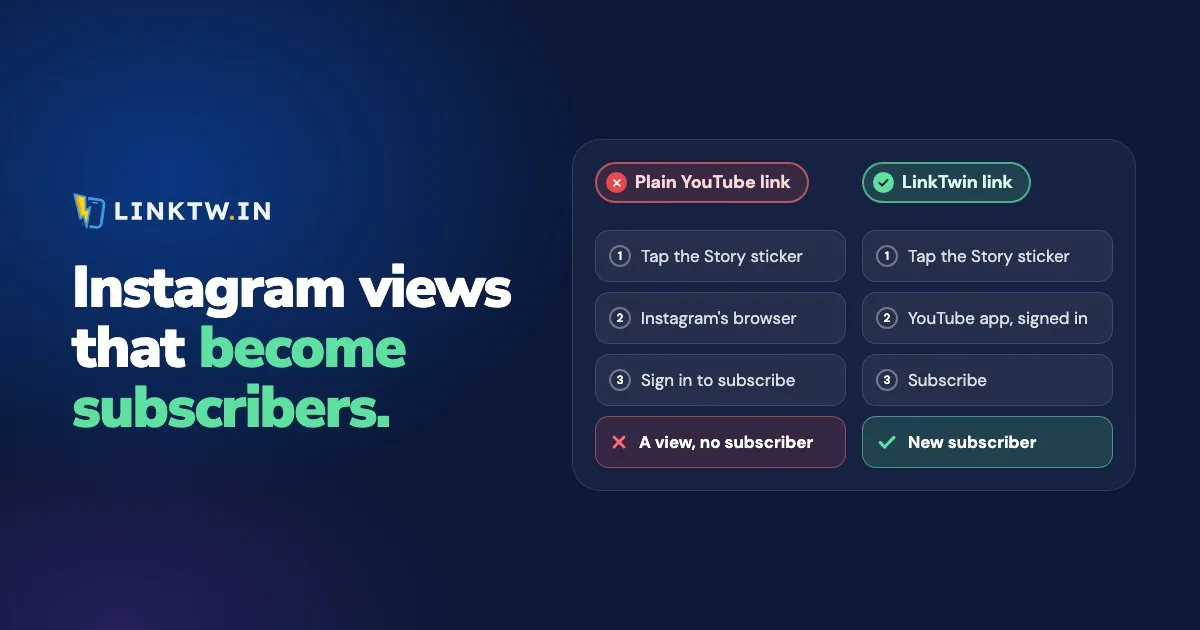
Each of those spots then needs a link that lands in the right place. A plain YouTube URL opens inside Instagram's own browser, where your follower usually isn't signed in to YouTube, so Subscribe asks for a login. A LinkTwin link opens the YouTube app from an Instagram Story, bio or DM, where your viewer is usually already signed in. YouTube links that open the app shows how that works for videos, Shorts and channels.
Instagram is stricter about links than YouTube, where descriptions, pinned comments and end screens can all carry one. On Instagram, each spot takes a different job:
| Where on Instagram | Can they tap a link? | What to post there |
|---|---|---|
| Reel | No, the caption is plain text for most accounts | A vertical clip of your best moment, with "full video: link in bio" on screen |
| Story | Yes, with a Link sticker | The thumbnail and a sticker that says "Watch the full video", saved to a Highlight |
| DM | Yes | The link, for everyone who comments asking for it |
| Bio | Yes, up to five links | Channel first, newest video second |
| Comments | No | A pointer to the bio |
Start the Reel on the moment people rewatched
Skip the intro. YouTube Studio's audience retention report marks top moments, where almost no one dropped off, and spikes, the parts people rewatched or shared. Those are your Reel. Cut one for a vertical screen rather than posting the wide video with bars, so faces and on-screen text stay readable, and end on the question the full video answers.
Put "full video: link in bio" on screen and in the caption. The caption still isn't a link, so the bio has to be ready before the Reel goes up.
Post a Story with a Link sticker on upload day
A Story reaches the people who already follow you, the ones most likely to subscribe. Post the thumbnail, add a Link sticker with your link, and change the sticker text to "Watch the full video". Older advice about needing 10,000 followers for a swipe-up is out of date: Instagram opened the Link sticker to all accounts in 2021, apart from new accounts and ones that repeatedly break its rules. Adding a link to an Instagram Story walks through the sticker step by step.
A Story disappears after 24 hours. Save the one for your channel to a Highlight, and it stays on your profile until you remove it.
Answer "link?" in a DM
End the Reel by asking people to comment a word if they want the full video, then send them the link in a DM, where it can be tapped. Someone who doesn't follow you yet gets that reply as a message request, which is easy to miss, so keep "link in bio" in the caption as the backup.
Keep the channel in the top bio slot
Instagram lets you add up to five links to your bio, and the first one is the one people see on your profile. Put the channel first and the video you're promoting second, and swap that second link when the next video is out.
When a playlist, a live stream or a sponsor needs a spot too, five fills up fast. A LinkTwin bio page in the first slot holds all of them, and a link in bio for YouTubers shows how to order it so a new visitor finds the channel first.
Make each tap open the YouTube app
A follower taps your Story sticker. With a LinkTwin link, the tap opens the YouTube app on that video, where they're usually already signed in and can subscribe without a login form in the way. Followers don't install anything or change a setting.
- In the YouTube app, open your channel or the video, tap Share, then Copy link.
- Paste it into Create App Link in your LinkTwin dashboard. Make one link for the bio, one for the Story and one for DM replies, all to the same place, so you can tell which spot sent people.
- Put each link in its spot, then tap the bio link from Instagram on your own phone. You should land in the YouTube app, on that channel or video.
- After a week, open the click report for each link: taps over time, country, device and source. It counts taps, not subscribers, so read it next to the subscriber numbers in YouTube Studio.
Custom endings, so the bio link and the Story link get names you recognize, are available from the Medium plan.
Common questions
Will a ?sub_confirmation=1 link fix this?
Not on its own: tapped in Instagram, it still opens inside Instagram's browser. A YouTube subscribe link works best where the viewer arrives signed in, which is usually the case in the YouTube app.
What if a follower doesn't have the YouTube app?
The LinkTwin link falls back to the same video or channel on YouTube's website. In Link Settings, "If the Destination App Is Not Installed" chooses whether that page opens in the phone's browser (the recommended choice) or stays inside Instagram.