
 YouTube Creators
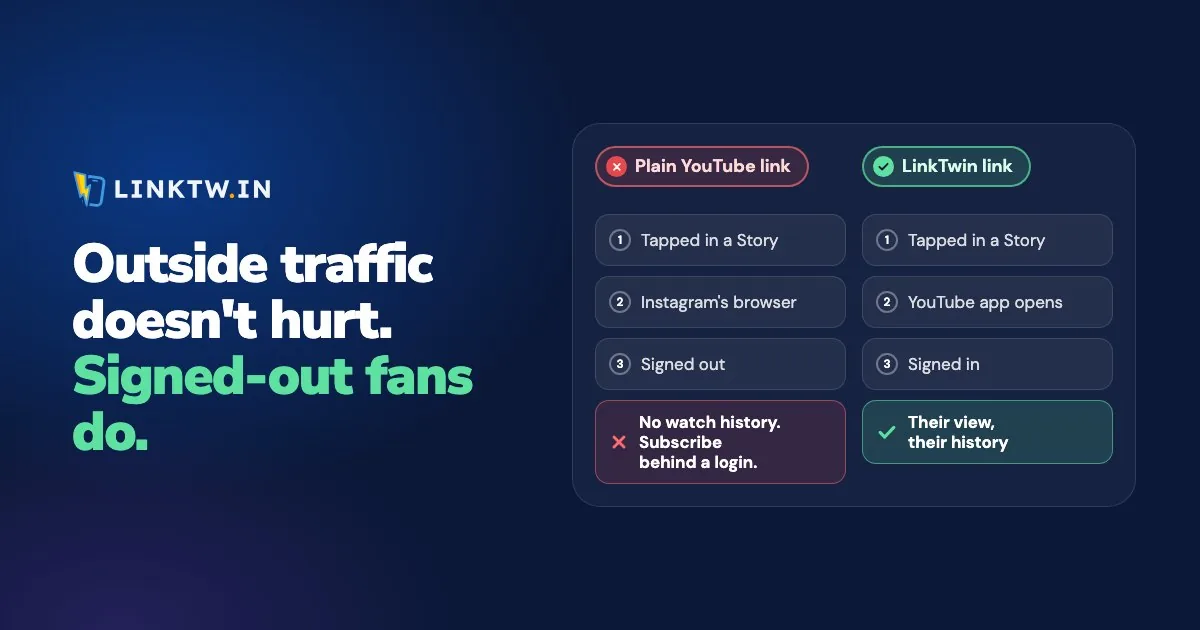
No. Sharing a YouTube video on Instagram, Reddit, Discord, in a newsletter or anywhere else outside YouTube shouldn't hurt how it does on Home, Suggested or Search. YouTube says each of those surfaces learns mostly from how the video performs there, so outside views are an extra pile, not a mark against the video.
In a November 2023 YouTube Blog post, Creator Liaison Rene Ritchie quoted Todd Beaupré, who leads Discovery and Growth at YouTube:
Search, Home, and Suggested features primarily learn from performance on those traffic sources respectively, so external traffic shouldn't hurt
That holds for a burst of quick exits too. When a video lands on a big subreddit and thousands of people click in and straight back out, average view duration drops and the chart looks like the share damaged the video. Ritchie's answer, in March 2024: "a massive influx of external clicks can look wild in your analytics, but it won't really mess with your recs."
The real cost: fans watching signed out
The one warning YouTube gives is about your own audience, in that same November 2023 post:
If your core audience, the ones that follow everything you do, are viewing on social in an embedded browser where they're not logged in and then not viewing on YouTube where they are logged in, that video won't go into their watch history which can affect future recommendations.
That embedded browser is the window Instagram or Facebook opens when someone taps a link. YouTube loads in it as a website, usually signed out, so Subscribe leads to a sign-in screen and the watch never reaches their history. Ritchie adds that this is why some creators post announcements on social instead of links. You can keep the link.
A LinkTwin link to your video opens it in the YouTube app from Instagram, Threads or an email, so your regulars watch signed in and the video goes into their watch history. It won't make YouTube recommend you more, and a click isn't a view. It fixes the one part of sharing that can actually cost you.
Where to share a YouTube video
Post it where people already talk about the topic, in the form that place welcomes. One community where the video answers a question people keep asking will do more than ten where the link only passes through.
| Place | What to post | What to watch for |
|---|---|---|
| A Story with a link sticker, or a Reel that points to the link in your bio | A URL typed in a caption isn't tappable | |
| TikTok | A clip that stops before the payoff, with the full video on your profile | The profile link needs 1,000 followers or a verified business account |
| X | A short clip or the thumbnail, a line on why it's worth watching, then the link | A bare link with no reason to click |
| The answer in the title and a few lines of text, then the video as the full walkthrough | That subreddit's own self-promotion rule, in its sidebar | |
| Discord | One post in the server's share channel, or a heads-up before a live | Sending the link to members one by one |
| Every upload on your Page; in groups, a how-to or a local video that fits the group | The same link across many groups in a few minutes | |
| The video you most want people to finish, with the thumbnail as the link | Sending to people who never signed up | |
| Sub4sub, view swaps, copy-paste comments | Never | YouTube's fake engagement and spam policies |
Most removals come from a community's own rule, not YouTube's, so read it, post once, and stay for the replies. Discord's Community Guidelines ban unsolicited bulk messages, and Meta's spam standard covers repetitive content posted at very high frequency, which is what one link pasted into twenty groups in ten minutes looks like.
The last row is a channel risk, not a matter of taste. Sub4sub deals, view swaps and "check out my channel" comments pasted under other videos break YouTube's fake engagement policy and spam policy, and bought views aren't external traffic, they're the thing that policy bans. As YouTube puts it, "If you hire someone to promote your channel, their decisions may impact your channel."
Which place sent the viewers
YouTube Studio gets you halfway. Its external traffic report lists the sites and apps where viewers found the video, so Reddit or Facebook can show up as a source, but it won't name the subreddit or the group. Signed-out viewers and apps YouTube can't identify land under Direct or unknown, with no label at all.
So give each place its own LinkTwin link, all pointing at the same video:
linktw.in/plant-reddit    the houseplant subreddit
linktw.in/plant-discord   the server's share channel
linktw.in/plant-group     the local garden group
linktw.in/plant-mail      Wednesday's newsletter
Each link counts its own clicks in the click report, with country, device and source, so the places sort themselves. Add a + to the end of one (linktw.in/plant-reddit+) and its stats page opens. Set those clicks next to the watch time Studio shows for each source and you'll see who tapped and who stayed. LinkTwin counts clicks, not views or watch time.
Make the links
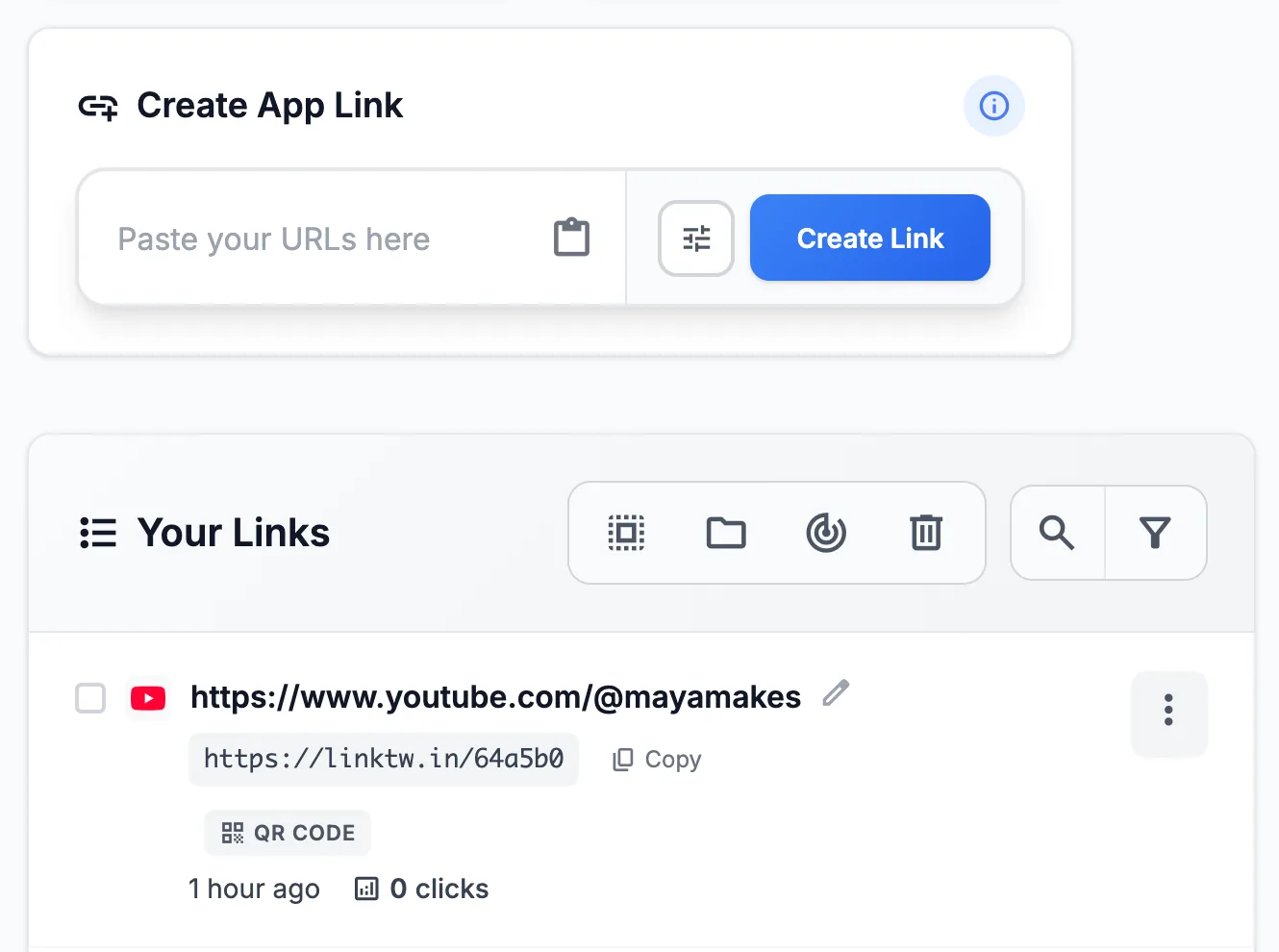
- In the YouTube app, open the video, tap Share, then Copy link.
- Paste it into the Create App Link box in your LinkTwin dashboard, once for each place you'll post, and name each link for its place. Endings such as linktw.in/plant-reddit are available from the Medium plan.
- Post each one under that place's rules. From Instagram, Threads, Facebook and email it opens the YouTube app (on Facebook for iPhone, after one tap on LinkTwin's bridge page), and if YouTube isn't installed, the link falls back to the video on the web.
- For TikTok, switch on Optimize Links For TikTok in Link Settings before you create the link, because TikTok keeps every link in its own browser.
These links are for everywhere outside YouTube. Cards, end screens and the description are the other half, the places YouTube gives you for a link on the video itself.
It's free to start: the free plan includes 10 links and 500 clicks a month.
Common questions
Do views from outside YouTube count toward Partner Program watch hours?
YouTube's eligibility page counts watch hours on public long videos and lists what doesn't count: private, unlisted and deleted videos, ad campaigns, and Shorts, which have their own route. It doesn't exclude any source of traffic, so a view from your newsletter looks like it counts the same as one from Home. Meanwhile, earning before the Partner Program runs on affiliate links, your own products and sponsors, none of which wait for YouTube's approval.