
 Tracking & Analytics
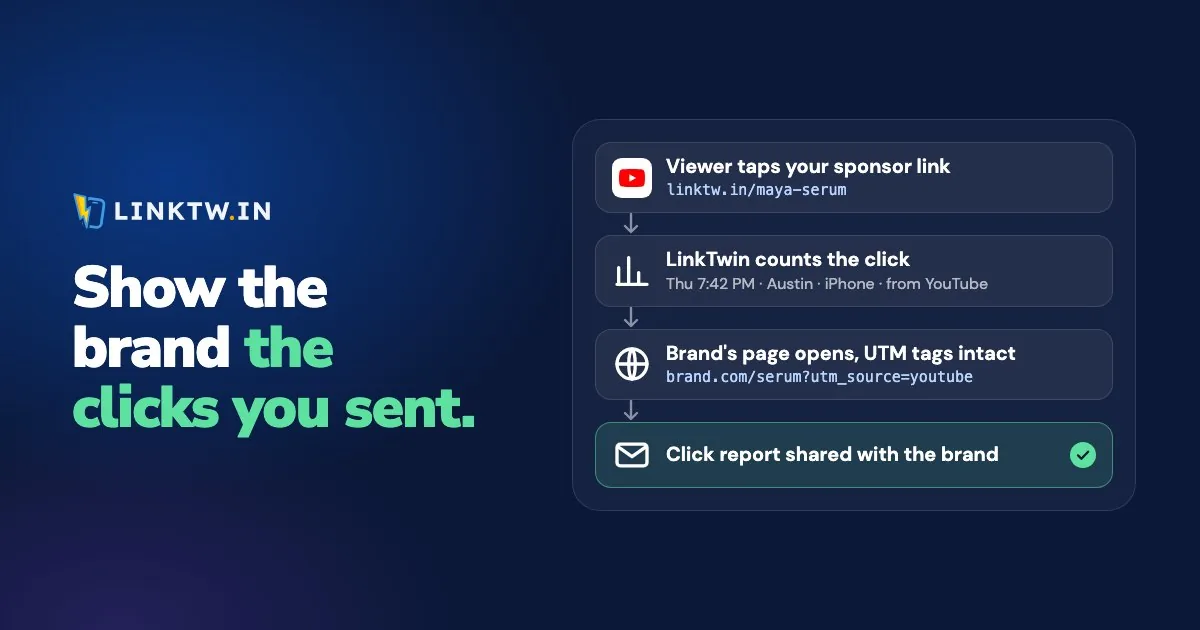
To track clicks on a sponsor's link, put the brand's tracking URL behind a LinkTwin link, post that short link in your video or Story, and share its click report with the brand when the deal ends. The brand's own tracking keeps working, because the tags on their URL go through untouched.
It usually starts the same way. A brand books a mention in Thursday's video and one Instagram Story, and sends a link like brand.com/serum?utm_source=youtube&utm_campaign=maya. Their analytics will count the visits it brings, and that dashboard is theirs: you see what they choose to share. When the renewal talk comes, it helps to bring a number of your own.
A LinkTwin link forwards each tap to the brand's tracking URL with its UTM tags intact, and records the click for you: the time, the country, the device and the app it came from. You post linktw.in/maya-serum instead of their long address, and the click report is yours to send.
| The brand's tracking | Your LinkTwin report | |
|---|---|---|
| What it counts | Visits and sales tagged with their UTMs or click IDs | Taps on your link, as clicks and unique clicks, with known bots left out |
| Detail | Whatever their analytics records once the page loads | Time, country, city when it can be located, device, browser and source |
| Who can open it | The brand's team | You, and anyone you share the stats page with |
| Sales and promo codes | Theirs to report | Not seen: LinkTwin counts clicks, not sales |
Set up the sponsor link
- Ask first. Some contracts want the brand's link exactly as sent. Get a yes in writing before you put your own link in front of it.
- Paste their full tracking URL into the Create App Link box in your dashboard and click Create Link. An ending you can say on camera, like linktw.in/maya-serum, is available from the Medium plan.
- Make one link per placement. The description, the pinned comment and the Story each get their own short link, so you can tell the brand which spot people tapped. Grouping one sponsor's links in a collection, with one shareable report for all of them, is available on every plan.
- Open each link on your phone before anything goes live, and check that the brand's page loads with their tags in the address bar.
- Post it, and check in between reports by adding a
+to the end of the short link (linktw.in/maya-serum+), which opens its stats.
Links to a brand's website, like links to your own, are included on every paid plan.
What happens to the brand's tracking
LinkTwin sends each tap to the address you pasted, query string and all, so UTM tags, click IDs and discount parameters reach the brand's site the way they wrote them. Two kinds of brand links behave in ways worth knowing before you post, and Amazon links need one setting checked:
- An affiliate network link. LinkTwin recognizes links from Impact, CJ, Awin, Rakuten, ShareASale and Partnerize, among others. LinkTwin doesn't skip the network: each tap still runs through the network's own redirect, just as the raw link would.
- A short link from a common service such as bit.ly. In most cases LinkTwin saves the full address the short link leads to, tags included, so taps skip the brand's short link and its click counter, just as when you switch your own links from Bitly. If the brand reads its numbers from that counter, tell them, and send your report in its place.
Campaigns move. The brand may swap the landing page halfway through, or the deal ends while the video keeps getting views for a year. Point the same short link somewhere new, and the description never has to change.
Changing where a link points after you share it is included on every paid plan.
Send the brand the report
When the brand asks how it went, open the link's stats, click Share stats, turn on public sharing and copy the public link. Anyone with it sees the same click analytics you do, with nothing to edit and no LinkTwin account needed. Turn sharing off when the deal ends, or reset the link to retire the old address.
Then put your numbers next to theirs in one short note:
- Clicks and unique clicks over the dates you agreed. Unique clicks count each IP address once.
- The top countries, and how many taps came from phones.
- Which placement got the taps: the description, the pinned comment or the Story.
- Your views from YouTube Studio or Instagram's Story insights, so the brand can work out a click rate.
Leave sales and promo code uses to the brand. Their visit count won't match your clicks exactly, because every tool filters its own way, and LinkTwin leaves out known bots and link-preview crawlers. Why link click counts don't match walks through the usual gaps, and how to track link clicks explains what each field in the report means.
Keep the report after the deal ends, too. The pitch email in how to get your first YouTube sponsor promises the next brand exactly this kind of follow-up.
When the deal includes an Instagram Story
On a Story, the short link goes in the Link sticker. Tapped there, a LinkTwin link opens the brand's site in Safari or Chrome, where shoppers' saved logins and cards live. A plain link would open inside Instagram's browser, where shoppers are often signed out.
Settle one thing with the brand before you post. If they plan to run your Story as a partnership ad, leave the sticker off: Instagram says you can't create partnership ads from Stories with organic link stickers, and the link goes on in Ads Manager as the ad's call-to-action sticker instead. The same goes for boosting: Instagram doesn't boost a Story with a link sticker, one of the limits behind an Instagram link sticker that isn't working. Say it's sponsored in the Story and in the video, too. Disclosure wording for creators has lines you can use.
Common questions
Can the brand see who clicked?
No, and neither can you. A tap on a link in a description or a Story carries no name, so the report shows when, where, on what device and from which app, never the person.
I already posted the brand's raw link. Can I still count it?
From the moment you swap it, yes. Put the short link in the description or the pinned comment and counting starts there. Taps before the swap went straight to the brand, and only their tools saw them.