
 YouTube Creators
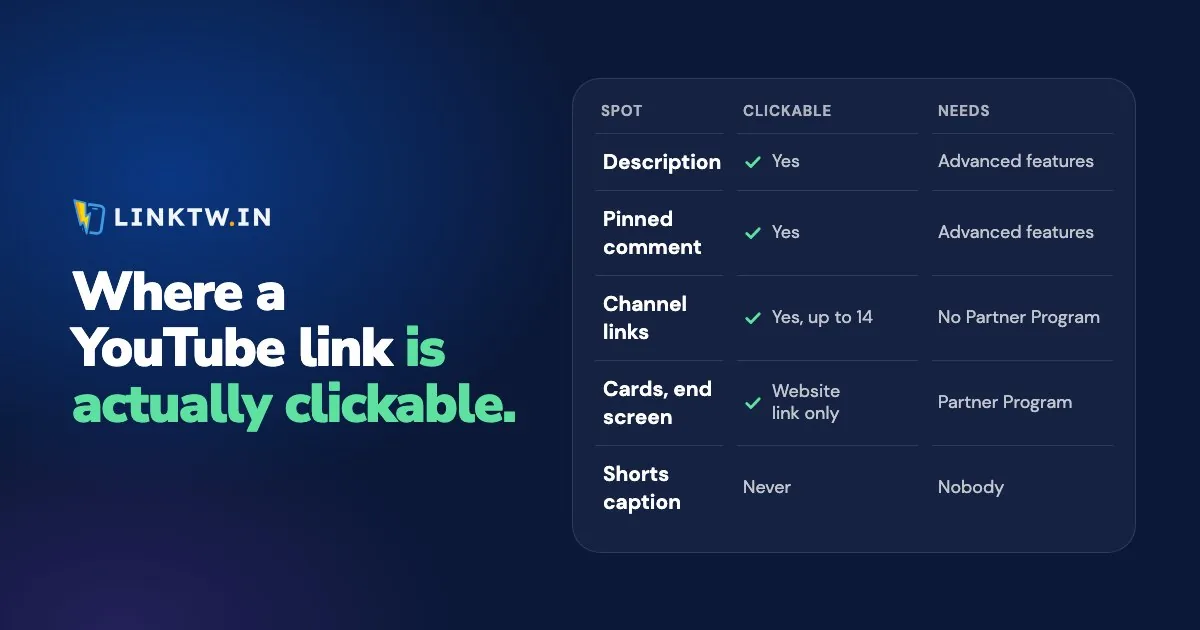
On YouTube, a link is clickable in a long-form video's description, in its comments (a pinned comment included), on your channel page, and, once you're in the Partner Program, in cards and end screens. A URL typed under a Short is never clickable, and on a TV nothing is, so those viewers need your channel links, an address you say out loud or a QR code.
Most of those spots also need your channel to have advanced features. And while YouTube Analytics reports clicks on end screens, there's no click count for a link in a description, a comment or your channel links, as far as its help pages show. A LinkTwin short link gives each YouTube spot its own address, so you can see which one your viewers actually tap.
Every place you can put a link on YouTube
These are YouTube's rules as of November 2026, from its page on clickable links and its feature access page.
| Place | Who gets a clickable link | What to know |
|---|---|---|
| Long-form video description | Channels with advanced features | Viewers see the first lines before "...more" |
| Comments, including a pinned comment | Channels with advanced features (pinning is one of them) | A pinned comment sits at the top of the comments |
| Channel profile links | Any channel, up to 14 links | The first one shows next to the Subscribe button |
| Info card to a website | Partner Program members | Up to five cards per video. Cards to a video, playlist or channel need no Partner Program |
| End screen to a website | Partner Program members | The last 5 to 20 seconds of a video at least 25 seconds long. Not shown on mobile web |
| Posts | Channels with advanced features | Without them, a URL in a Post stays plain text |
| Live chat | Anyone in the chat | Clickable on horizontal streams, plain text in the vertical live feed in the app |
| Shorts description and comments | Nobody | Plain text since August 31, 2023 |
| Shorts related video | Channels with advanced features | Only to your own public or unlisted video, Short or live stream |
| Sponsored Short | Creators in a brand deal the brand has reported | One link to the brand's site |
| Said aloud, shown on screen, or a QR code | Anyone | The only kind of link a TV viewer can use |
Every row also falls under YouTube's external links policy, which covers even an address you only say on camera.
Advanced features and the Partner Program
Advanced features turn on clickable links in descriptions, comments and Posts, plus pinning and the Shorts related video. You can see whether you have them in YouTube Studio on a computer, under Settings, Channel, Feature eligibility. Most active channels qualify through their channel history. Others can verify with an ID or a short video, though YouTube doesn't offer that to every creator.
The Partner Program is a second gate, and it only matters for a website link in a card or an end screen. YouTube's eligibility page asks for advanced features and 1,000 subscribers, plus either 4,000 public watch hours in the last 12 months or 10 million qualified Shorts views in the last 90 days. Until you're in, your description, your pinned comment and your channel links carry every outside link, and that's enough to make money on YouTube before monetization.
Give each spot its own short link
Put the same raw link in your description, your pinned comment and your channel page, and one click total can't tell you which spot did the work. Separate LinkTwin links can.
- Paste the destination into the Create App Link box in your LinkTwin dashboard: a product, a sponsor's page, your shop or a video. Links to your own website or shop are included on every paid plan.
- Make one link per spot, such as
linktw.in/kit-descfor the description andlinktw.in/kit-pinfor the pinned comment. Custom endings like these are available from the Medium plan. - Put each link only in its spot. Every LinkTwin link comes with a QR code, so the same link can go on screen for TV viewers.
- Compare after a week in the click report: clicks over time, country, device and the source of each tap. It counts clicks, not sales or subscribers, so read it next to your affiliate report.
The description, the pinned comment and old videos
The description is the spot most viewers will reach, so the link the video is about goes on its first lines, with a label that says what it is. Making YouTube description links clickable explains why a link stays plain text and what to put on line two. Repeat the same link in a pinned comment for people who read the comments before the description.
Affiliate links need one more layer. A separate link and tracking ID for each video is how you track affiliate clicks per video, and Amazon Associates for YouTubers covers the YouTube side of Amazon's program.
Descriptions age badly. A product sells out, a program changes, and a hundred old videos point at a dead page, which is why it pays to update links in old YouTube descriptions in one pass. Changing where a link points after you share it is included on every paid plan.
Those click counts are also what you send a brand after a paid mention, and a number to show when you land your first YouTube sponsor.
Shorts, TV viewers and your channel page
A Short has one built-in link, the related video, and it can only point at your own content. Links in YouTube Shorts lists the few other spots on a Short that take a link, and where everything else has to go.
Your channel page is where Shorts and TV viewers go looking for "the link", because the video gave them nothing to tap. Give the first slot to whatever your recent videos mention most, or to a LinkTwin bio page that holds several links behind one address, the setup in a link in bio for YouTubers.
On a TV, the description can be read but not tapped. A QR code in your video reaches those viewers through their phone, and built from a LinkTwin link, every scan shows up in the same click report.
Subscribe gets its own link, too. A YouTube subscribe link covers the URL ending that asks a computer viewer to confirm, and the link that opens your channel in the YouTube app on a phone.
Links that send people to your videos
The other half of the job happens off YouTube: the Story, the Reel and the bio link that bring people to a video. Whether those outside views count against a video is a common worry, and what external traffic does to a video has YouTube's own answer. Tapped in Instagram, a plain youtube.com link opens in Instagram's own browser, where most viewers aren't signed in to YouTube. A LinkTwin link opens the YouTube app from an Instagram Story, where your viewer is already signed in and can subscribe in one tap. The YouTube links page shows that tap.
What to post around that link is a playbook of its own. On Instagram, it's Reels, Stories and DMs that point at the channel, the plan in promoting your YouTube channel on Instagram.
On TikTok, the clip itself does the selling: promoting YouTube videos on TikTok shows how to cut one that stops before the payoff, so the full video is the only place to see the end.