
 Deep Linking
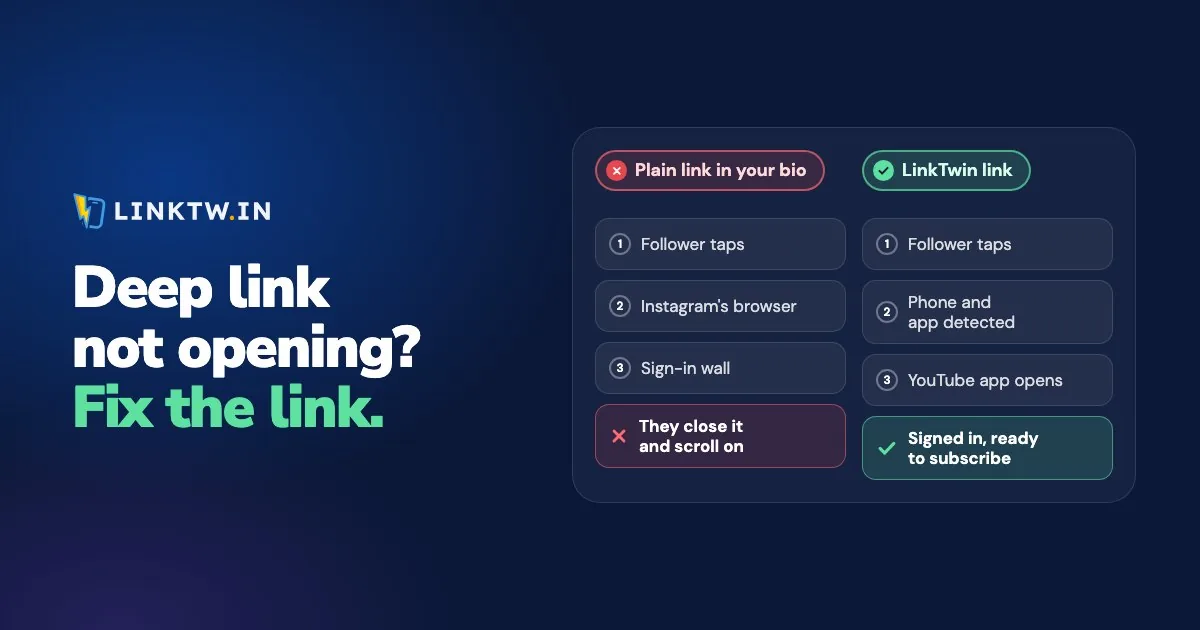
When a deep link opens the website instead of the app, the link is almost never broken: either the app you posted it in kept the tap in its own browser, or the phone has been told to use the browser. Paste the link into Notes and tap it. If the app opens there but not from your post, the place you posted it is the problem, and the link you post is the fix.
For creators, it usually goes like this. You put a YouTube video, an Amazon product or a Spotify song in your Instagram bio or a Story. It opened the app when you texted it to yourself, but your followers get the website inside Instagram, signed out, and the subscribe or the sale stalls there. A LinkTwin link opens the app from an Instagram bio, Story or DM: it looks at the phone and at the app the tap came from, then opens YouTube, Amazon, Spotify or one of 100+ other apps directly, where your follower is already signed in.
| Where the website opens | What's going on | What fixes it |
|---|---|---|
| Your bio, a Story or a post, while Notes opens the app | The social app loaded the link in its own built-in browser | A LinkTwin link in place of the plain one |
| Notes and texts too | The app is missing, the address isn't one it opens, or the phone saved a choice | The phone checks further down |
| Safari's or Chrome's address bar | Nothing is wrong: a typed address always loads the website | Nothing. Test from Notes instead |
How to test a deep link
- On a phone that has the app, paste the link into Notes, or text it to yourself, and tap it. If the app opens, the link itself works.
- On iPhone, press and hold the link instead of tapping. A working link offers the app as well as the browser. That's the check Apple gives developers for universal links, and the same note says a URL typed into the address bar will never open the app.
- Then tap it where your audience will: your bio, a Story, a text or an email you actually sent. A friend's phone is the better judge for this last check, since yours may still hold choices you made months ago.
It opens the app from Notes, not from your post
Instagram, Facebook and X open a tapped link in a browser built into their own app. The phone never receives the tap, so it never gets the chance to hand the address to YouTube, Amazon or Spotify, and the website loads instead. That's why the same link can work perfectly from Notes and fail from your bio: the link isn't broken, it's being opened somewhere that never asks the phone. How in-app browsers work goes through what each social app does with a tap.
You can't change Instagram's browser, but you can change the link. Paste the video, product or song into LinkTwin's deep link generator and post the short link instead of the plain one. From Instagram and Threads, and from texts, email and QR codes, it opens the app directly; on Facebook and X for iPhone, your follower taps once on LinkTwin's page first. A link to an ordinary website goes out to the phone's own browser (Safari, Chrome and others), where your follower's saved logins and cards are. TikTok is different, and why TikTok links stay in TikTok shows what your viewers see there.
The browser opens from Notes too
If the Notes test lands on the website as well, the social app isn't the cause, and a new link won't help until the phone side is right. This is the path for a universal link or an Android App Link (the two https kinds of deep link) that opens the browser on every tap. Check these in order.
Is the app on the phone?
No link can open an app that isn't installed, so the browser is simply the fallback doing its job. If the app used to open these links and stopped, update it, and if that doesn't help, reinstall it. A phone learns which addresses an app owns when the app is installed or updated, so a fresh install refreshes that list.
Is it a link the app opens?
- Copy it from the app's Share button. Apps only open the addresses their makers chose. Help pages and account pages often stay on the web on purpose.
- Post the normal https link. Raw app addresses such as
spotify:track:...do nothing for anyone without the app, so don't build them by hand. - Test the link that went out. Email tools that count clicks often rewrite your link into their own redirect. Send yourself a real message and tap that, not the draft.
Did the iPhone remember Open in Safari?
When you press and hold a link and choose the browser, iPhone keeps that choice for every later link from the same site, so one accidental Open in Safari can stick for months. There's no list of these choices in Settings to edit. You change it the same way: paste a link from that site into Notes, press and hold it, and pick the app.
On Android, is Open supported links on?
When an app isn't allowed to open its web links, Android hands them to the browser, which is the usual reason Android App Links open Chrome. Open Settings, then Apps, pick the app, tap Open by default and turn on Open supported links, then tick the addresses under Links to open in this app. Those are the names on Google's Android documentation, and other phone brands word them a little differently.
Only one app at a time can own an address. If another app took it, open that app's Open by default screen and tap Clear default preferences. None of this pulls a plain YouTube or Amazon link out of Instagram's browser, though, because the phone never sees that tap. And if the app is your own and its links fail everywhere, the fix sits with whoever built it (the file on your website that pairs the site with the app), not with the link.
Swap in a link that opens the app
If Notes opens the app and your bio or Story doesn't, stop changing phone settings and change the link you post.
- Copy the https link from the app's Share button: the video, the product or the song.
- Paste it into the Create App Link box in your LinkTwin dashboard, or try it first in the deep link generator.
- In Link Settings, leave If the Destination App Is Not Installed on Open in External Browser, the recommended option, so a follower without the app gets the web page in Safari or Chrome rather than inside Instagram.
- Put the short link where the old one was, then tap it from Notes and from the app you posted it in.
- Open the click report for clicks over time, country, device and the source of each tap. Adding a
+to the end of the short link (linktw.in/new-video+) opens the same stats.
The free plan includes 10 links and 500 clicks a month.
Common questions
Why does a page show before the app opens?
That's LinkTwin's confirmation page, which tells your follower where the link is taking them. It's on by default, and so is Skip Confirmation Page, which moves on by itself if nobody taps (after 5 seconds, a delay you can change in Link Settings). On Facebook and X for iPhone, only a tap on the page's button opens the app: if your follower waits, the automatic continue loads the web page inside that app instead. So if you post there, keep the page on and give followers time to tap: lengthen the delay, or turn Skip Confirmation Page off so the page waits for the tap.
Why does it open the app on my phone but not on a follower's?
Usually one of three things: they don't have the app, they tapped a plain link inside a social app while you tested from Notes, or their phone saved a choice to open that site in the browser. A LinkTwin link takes care of the second. The other two live on their phone, and for a YouTube link, YouTube links not opening in the app covers both iPhone and Android.