
 Instagram, TikTok & In-App Browsers
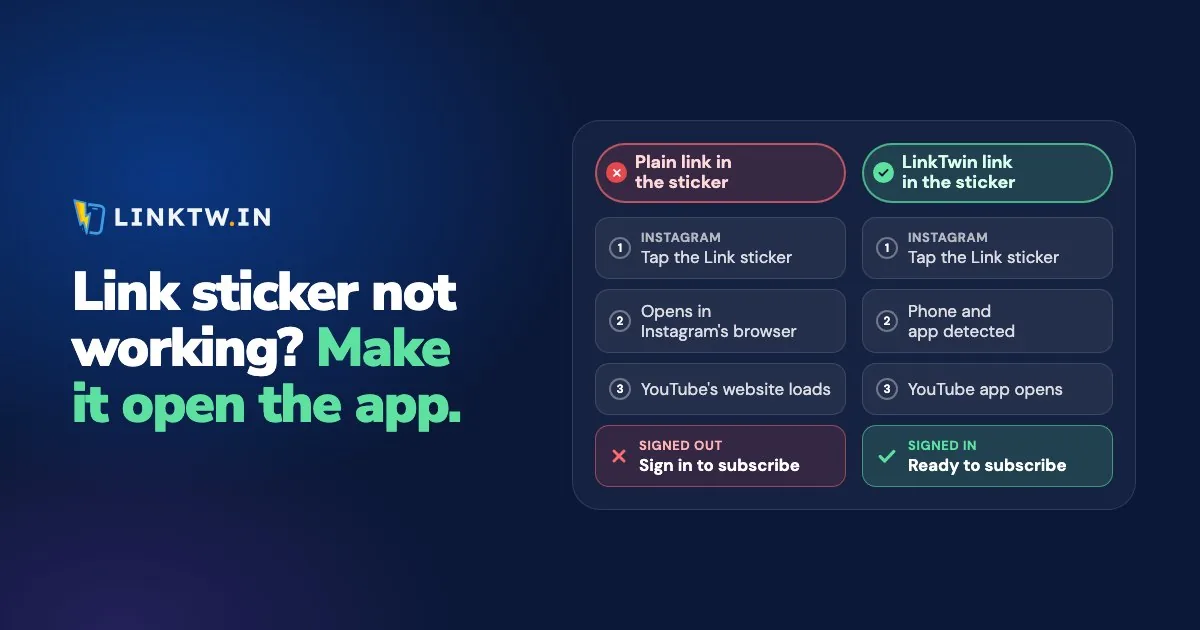
An Instagram link sticker that isn't working has one of three problems: the Link sticker isn't available to your account, Instagram won't accept the URL, or the tap works and opens the page inside Instagram's own browser, where your follower is often signed out. Check Account Status when the sticker is missing, check the address when Instagram refuses it, and post a link that opens the app when taps land in Instagram's browser.
The last one is Instagram's default. Your Story shows a clip of your new video, the sticker holds a youtube.com link, and the video opens inside Instagram, where Subscribe can ask your follower to sign in to Google. A LinkTwin link in a Story sticker opens YouTube, Amazon, Spotify and 100+ other apps directly from Instagram, where your follower is already signed in, and sends website links to the phone's own browser.
| What you see | What's behind it | What to do |
|---|---|---|
| No Link sticker in the sticker tray | A new account, or a restriction on yours | Check Account Status, or give a new account time |
| Instagram won't take the URL, or a warning shows when someone taps | Instagram doesn't say why it refuses a particular address | Check the address, and make the sticker text match the page |
| You can't boost the Story | Instagram doesn't boost Stories that contain link stickers | Leave the sticker off, and add the link as an action button while you create the ad |
| The page opens inside Instagram, often signed out, or as the website instead of the app | Instagram's in-app browser, the default for links in Stories | Put a LinkTwin link in the sticker |
One tip of our own, not an Instagram rule: when followers say the sticker won't respond, check that no text or other sticker overlaps it, and give it clear space in the frame.
When the Link sticker is missing
Instagram opened the Link sticker to every account, with no follower minimum. The same announcement names two exceptions: new accounts, and accounts that repeatedly share content that breaks the Community Guidelines. Instagram doesn't say how long a new account has to wait.
For the second case, open Account Status. Go to your profile, tap the menu at the top right, and below More info and support, tap Account Status. Instagram lists anything your account can no longer use under Features you can't use, with the steps it offers, such as asking for a review of content it removed.
Instagram doesn't name any other cause. The steps for adding the sticker, and what to write on it, are in how to add a link to an Instagram Story.
When Instagram won't accept the link
Instagram doesn't say why a sticker refuses a particular address. What it does document is that its in-app browser screens pages for scams and malicious sites, and Meta's spam rules cover misleading links, described as content with a link "that promises one type of content but delivers something substantially different."
So open the address in your phone's browser before you paste it, because a typo or a cut-off URL breaks the page whatever the sticker does. Then make the sticker's text say what the page is.
When the tap opens the wrong place
A LinkTwin link can't bring back a missing sticker or get a refused address accepted, but it does change what happens after the tap. Instagram says that by default a link tapped in a post, an ad, a Story or a message opens in its in-app browser. Like other in-app browsers, it keeps its own cookies, apart from Safari, Chrome and the apps on the phone, which is why followers often arrive signed out of YouTube, Amazon or your shop. What an in-app browser is goes through the rest of what that window changes.
Signing in there isn't always possible either. Google says it might stop sign-ins from browsers that are "embedded in a different application." And few followers ever leave Instagram's browser by themselves, so that's where the visit usually ends.
You fix this with the URL in the sticker. LinkTwin's Instagram link opener looks at where a tap came from: inside Instagram, a link to YouTube, Amazon, Spotify or another supported app opens that app, and a link to an ordinary website opens in Safari or Chrome, where saved logins and cards live. When the app isn't installed, the web page opens in the phone's browser, outside Instagram.
Links to your own website or shop are included on every paid plan.
Put a LinkTwin link in the sticker
- Copy the page you want opened: the video, the product, the track, your shop or your WhatsApp chat link.
- Paste it into the Create App Link box in your LinkTwin dashboard, then copy the short link.
- In the Stories camera, add the Link sticker, paste the short link, and change the sticker text to the action, like "Watch the video".
- Post the Story, then tap the sticker from a phone that has the app.
Each tap also lands in your click report, with the time, country, device and source. Instagram's Story insights count link taps for each Story, and a separate LinkTwin link per Story adds when, where and on which phones. It also keeps Story taps apart from bio taps, since both arrive from Instagram.
Your bio and your DMs open links in the same browser, and why Instagram links open in the browser shows how one LinkTwin link covers all three spots.
Common questions
Can I change where the sticker goes after I post the Story?
If the sticker holds a LinkTwin link, you don't need to touch the Story. Change where the link points in your dashboard, and the next tap goes to the new page, in the Story and anywhere else you posted that link.
Changing where a link points after you share it is included on every paid plan.
Why don't Instagram's link taps match LinkTwin's clicks?
Both count taps, but LinkTwin leaves out known bots and the crawlers that fetch link previews, while Instagram gives a per-Story count. Why link click counts don't match goes through the usual gaps.