
 YouTube Creators
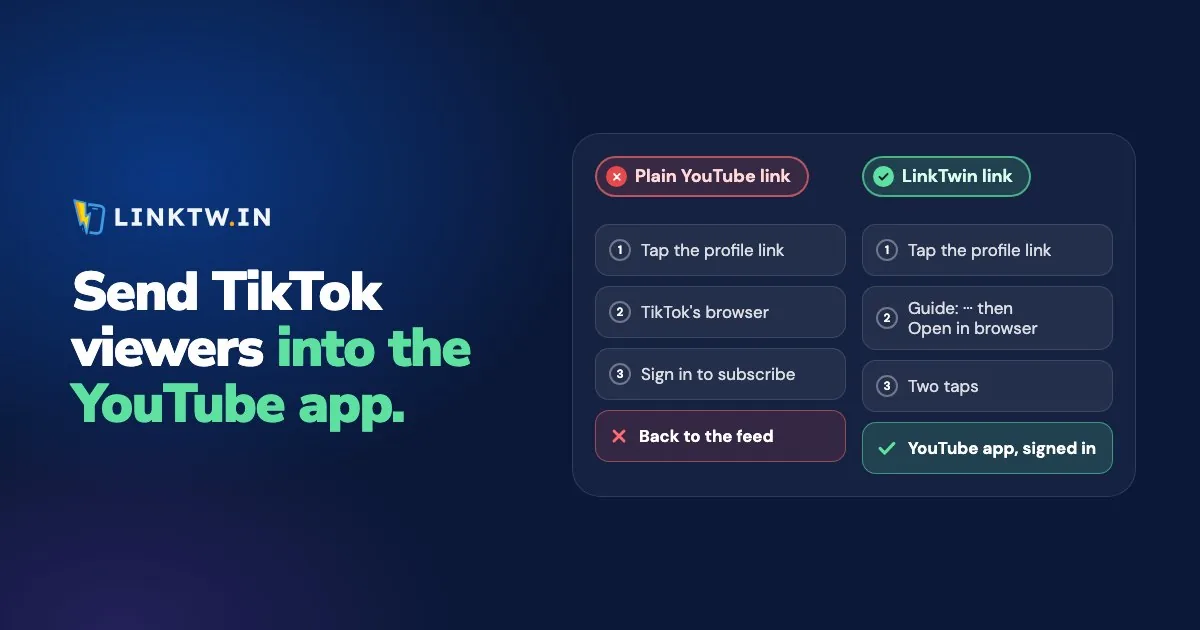
To promote a YouTube video on TikTok, post a clip cut for TikTok that stops before the payoff, and put a link to the full video on your profile. Inside TikTok, that link opens in TikTok's own browser, where many viewers aren't signed in to YouTube, so the video can play but Subscribe and Like ask them to log in first.
A LinkTwin link on your TikTok profile walks viewers out of TikTok's browser and opens your video in the YouTube app, where they're signed in and Subscribe works. Tapped inside TikTok, it fills the screen with a guide that points at the ··· button and then Open in browser. Those are two taps in TikTok's own menu, and no link can skip them, because TikTok doesn't let any link leave on its own. After them, the YouTube app opens on your video. If the app isn't installed, the video plays on YouTube's website in the phone's real browser, still outside TikTok.
The link needs somewhere to live. TikTok gives the tappable Links field to accounts with at least 1,000 followers or a verified business account, and a URL typed into a caption or comment stays plain text. Adding a link to your TikTok bio shows who qualifies and where the field is, and why TikTok links stay in TikTok walks through the menu screen by screen.
Clips that make people leave the feed
Leaving TikTok takes effort: open your profile, tap the link, get through the menu. People do that for a missing piece, not for a clip that already showed the ending.
- Show the setup, hold back the result. Cut before the outcome and say the result is in the full video.
- Part one here, part two on YouTube. Start a story the long video finishes, and make sure the link opens that video, not your channel page.
- One full tip, then the rest. Give away one moment that works on its own and point at the longer video for more. Only promise what that video contains.
Here's how that looks for a woodworking channel. The clip: a warped tabletop, a hand plane, forty seconds of shavings, and it ends as the straightedge goes down. The last line on screen: "Did it come out flat? Full fix on YouTube, link on my profile." The caption says the same for people watching with the sound off. And the profile link is linktwin.co/tabletop, pointing at that one video.
Cut each clip for TikTok instead of reposting the footage as it is. TikTok's integrity and authenticity guidelines say content is ineligible for the For You feed "if it includes unoriginal or reused material without anything new", and the For You feed is where the reach comes from. TikTok doesn't list what counts as new, but a vertical recut, a first line written for TikTok, captions or a voice-over are the kinds of changes that make a clip your own.
Keep the profile link on the video your clip is about until that clip has stopped getting views. Someone who came for part two and lands on a newer upload just leaves. Once they're on YouTube, your end screen and cards, two of the places YouTube gives you for a link, can carry them on to the next video.
Put the link on your profile
- Switch on the TikTok domain. In Link Settings, turn on Optimize Links For TikTok, and leave When Opened Inside TikTok on Guide Users To Open In Browser, the recommended option. New links then use linktwin.co, the domain built to work reliably inside TikTok.
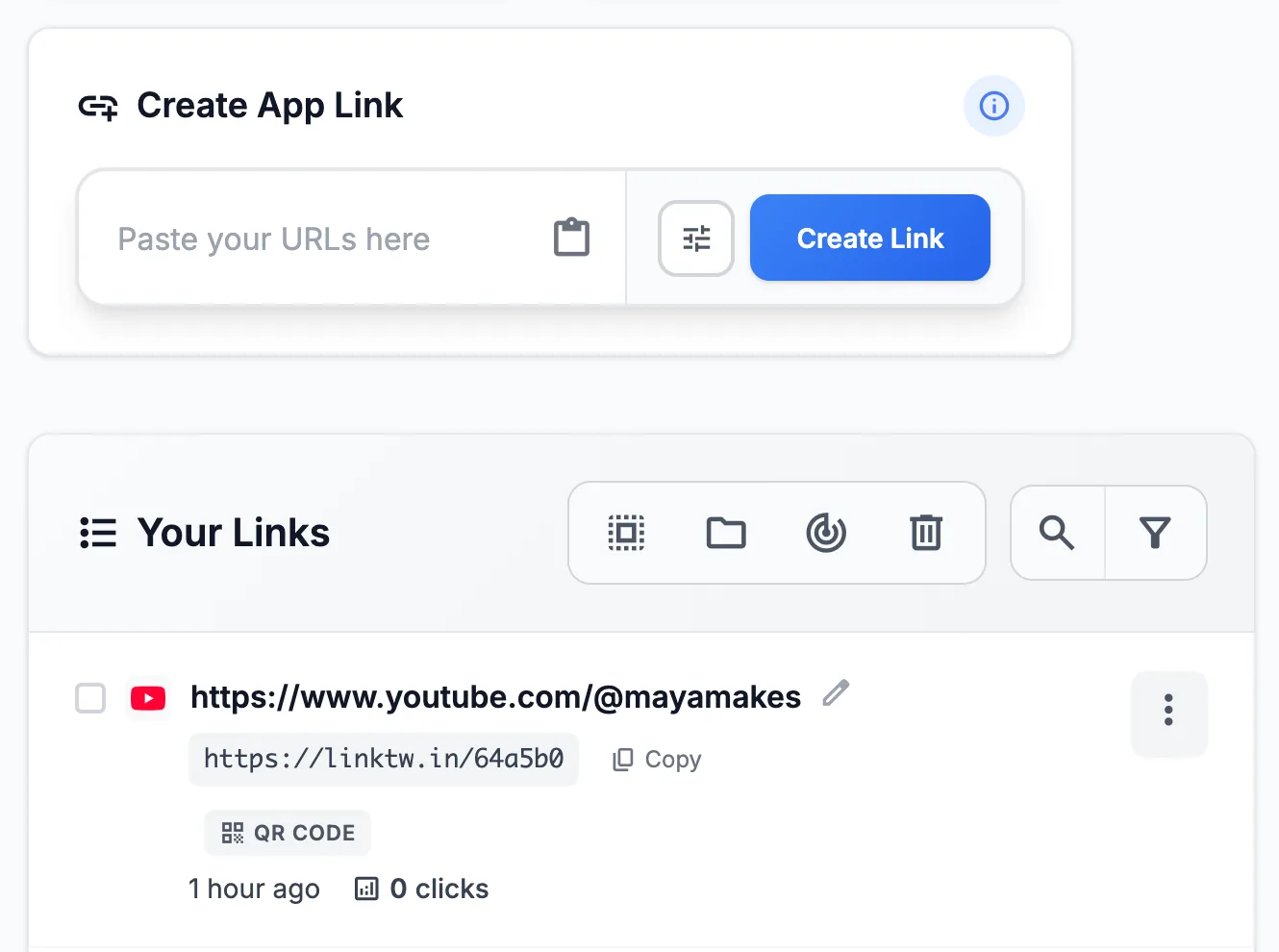
- Create the link. In the YouTube app, open the video, tap Share, then Copy link, and paste it into the Create App Link box in your dashboard. The short link should start with linktwin.co. Endings such as linktwin.co/tabletop are available from the Medium plan.
- Add it to TikTok. Go to Edit profile, then Links, and paste it.
- Test it on someone else's phone that has the YouTube app. Tap the link on your profile: you should see the guide, then your video in the YouTube app.
It's free to start: the free plan includes 10 links and 500 clicks a month.
One video, or always the newest upload
Point the link at the video your clips are about. A channel link asks people to find the right video after they've done the hard part of getting out of TikTok.
If every clip promotes whatever you uploaded last, paste your channel link instead and switch on Latest Video on that link's edit page. The link follows each new upload, and your TikTok profile never needs editing. Don't use it for a part-two clip, though: that viewer needs one specific video, even after you've posted something newer.
Latest Video is included on every plan.
How to tell the clip sent anyone
Look at two numbers and expect them to disagree. In the click report, a jump in clicks on the day the clip went up means people tapped, and you'll see when, from which country and on which device. In YouTube Studio, open the video's Reach tab and check External, where views from other apps and sites show up.
The gap between them is real. A tap that stopped at TikTok's menu is a click, not a view, and views from people who weren't signed in often land under Direct or unknown instead of External. LinkTwin counts clicks, not views or subscribers, so set the click line next to your subscriber graph for the same days.
Common questions
Should I upload the whole video to TikTok?
You can, but then the viewer already has it. If you want the YouTube view and the subscribe, keep the full video on YouTube and post a clip that needs it.
Can I use the same link in my Instagram bio?
Yes. From Instagram there's no guide screen at all: the same link opens your video in the YouTube app straight from the tap. Sharing your video outside YouTube goes through the other places worth posting it, and why outside views don't hurt the video.