
 Branded Links & QR Codes
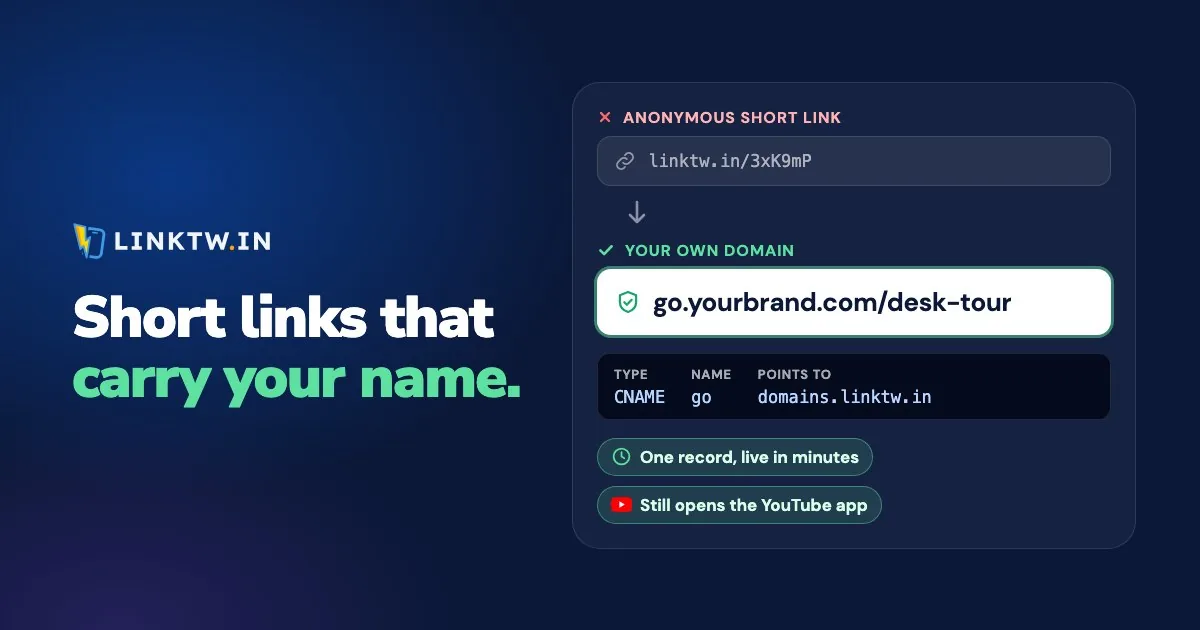
To connect a custom domain to your short links, add one CNAME record at your DNS host: the name is a subdomain you aren't using yet, such as go, and the target is domains.linktw.in. LinkTwin sets up the SSL certificate once the record points there, so there's nothing to buy or renew.
What changes is the name people read before they tap, in your captions and on the link preview card chat apps draw: go.yourbrand.com/mic-sale instead of a linktw.in address. What doesn't change is the tap. A LinkTwin link on your own domain still opens YouTube, Amazon, Spotify and 100+ other apps from an Instagram bio or Story, where your follower is already signed in, with your brand in front of every link. Your website on yourbrand.com and the records that deliver your email stay exactly where they are.
Custom domains are available from the Medium plan.
| DNS field | Enter this | Why |
|---|---|---|
| Type | CNAME |
An alias to a hostname |
| Name (Host) | go, or @ on a root domain |
Only the label in front of your domain. Some panels add the domain for you, so a full address can save as go.yourbrand.com.yourbrand.com |
| Target (Value, Points to) | domains.linktw.in |
Where visits to go.yourbrand.com are sent |
| TTL | Auto, or the provider's default | How long other servers may cache the answer |
| Proxy status (Cloudflare only) | DNS only | A proxied record answers with Cloudflare's addresses instead of your CNAME (Cloudflare on proxy status) |
Add the record wherever the domain's DNS is managed, which is usually the registrar you bought it from. The menus differ from one provider to the next, but the fields are the same. This record is only for short links: a domain for a link-in-bio page is set up differently, as a custom domain for your link in bio explains.
Which name to use
A subdomain of a domain you already own is the easy path: go.yourbrand.com, link.yourbrand.com or shop.yourbrand.com. It costs nothing extra, it takes this one record, and the rest of the domain doesn't notice.
yourbrand.com on this record takes your site offline. When you add a domain, LinkTwin checks it, and if it finds a live website it warns you and suggests a subdomain such as go or link instead.A short domain bought only for links, such as yourbrand.link, reads well in a caption, but it adds a yearly fee and the CNAME has to sit on the root, written as @. Many registrars won't save a CNAME on a root, so if yours refuses it, use a subdomain such as go instead.
Add the domain in LinkTwin
- Save the address. In the dashboard, open Branded Domains, choose Add Domain and type the full address with https, for example
https://go.yourbrand.com. The name can't be edited after it's saved, so check the spelling first. - Fill the two redirects if you want them. Domain Root is where someone lands who types
go.yourbrand.comwith nothing after it, usually your website. 404 Redirect catches an address that isn't a real link. - Read the check. Before saving, LinkTwin looks up the name. If it finds A or AAAA records, it lists them, because they would override your CNAME: delete them at your DNS host. MX, TXT and NS records can stay.
- Publish the CNAME from the table above.
- Test, then make it the default. When a test link works, open Link Settings and choose the domain under Default Domain, so every new link uses it. You can still pick another domain on a single link.
How long it takes
DNS changes usually take 5 to 30 minutes and sometimes up to 24 hours. Branded Domains marks the domain Active once LinkTwin can see the record, and HTTPS usually comes last, because the certificate is issued after the record points at LinkTwin. A brand-new subdomain often works within minutes. If you opened the address before the record existed, your network may remember "this name doesn't exist" for an hour or so, and testing on your phone's mobile data usually gets around it. A certificate warning that won't go away means the record doesn't point at LinkTwin yet; if it does, contact LinkTwin support.
Check that it worked
- Look at the status. The domain shows Active in Branded Domains. To check the record yourself,
dig +short CNAME go.yourbrand.comon a Mac (ornslookup -type=CNAME go.yourbrand.comon Windows) should answerdomains.linktw.in. - Open the bare address, such as
https://go.yourbrand.com. It should load with no certificate warning, and if you set a Domain Root, that's where you land. - Tap a real link on a phone. Create a link to a YouTube video on the new domain, send it to yourself in an Instagram DM and tap it. The YouTube app should open, the same as from a
linktw.inlink.
When the domain won't load
| What you see | Likely cause | What to do |
|---|---|---|
| The address doesn't load | The record is missing, the Name field holds the full address, or your network remembered an earlier "not found" | Check the record and the Name, then wait or test on mobile data |
| The lookup returns IP addresses, not a CNAME | The Cloudflare record is proxied, or an old A or AAAA record uses the same name | Set the record to DNS only and delete the old records |
Once the domain is active
You can add more than one domain, keep one as the default and choose another on a single link: one per brand, per client or per campaign. The custom branded domains page has examples. Deleting a domain in Branded Domains stops every link on it, so keep any domain that's printed on packaging or inside a QR code, and dynamic and static QR codes explains why a printed code should carry a short link you control. Moving short links over from another service? Switching from Bitly covers recreating the endings people already have before you change the record.
Common questions
How many domains can I connect?
It depends on your plan, and the pricing page lists the number for each. Add each one under Branded Domains, then pick one as the default.
Do my existing links move to the new domain?
Not by themselves. Every link created after you set the new default uses your domain. An existing link's domain can be changed on its edit page, but that gives it a new address, so leave the links you've already posted where they are.